<![CDATA[naildrivin5.com - David Bryant Copeland's Website]]>2024-04-01T12:39:12+00:00https://naildrivin5.com/<![CDATA[Sustainable Dev Environments with Docker and Bash Available Now]]>2024-04-01T08:00:00+00:00https://naildrivin5.com/blog/2024/04/01/sustainable-dev-environments-with-docker-and-bash-available-now.htmlMy new book “Sustainable Dev Environments with Docker and Bash” is now available for $19.99. It will teach you Docker and Bash fundamentals you can apply to build a dev environment for any tech stack, that runs on Windows, macOS, and Linux.
This isn’t just recipes to copy and paste (although you will see those for the running example). This explains what the difference is between a container and an image, how to navigate DockerHub to find the right images and use them properly. It also provides a basic strategy for how to install any software in a Docker image.
I have used the techniques and code in this book to maintain many different dev environments for my personal projects, as well as
the dev environment for my last startup. When upgrading my computer, or even switching computers, everything just worked. If
you’ve struggled with rvm, asdf, or any other version manager, this will make things better.
]]><![CDATA[Methods Don't Succeed our Fail: they Have Outcomes]]>2024-03-01T09:00:00+00:00https://naildrivin5.com/blog/2024/03/01/methods-dont-succeed-or-fail-they-have-outcomes.htmlOn Matstodon, Peter Solnica posted some Ruby pattern-matching code, asking what Rails devs think about it. While pattern matching is interesting, I think I still prefer if statements based on return objects. But, I also think the “success/failure” dichotomy is unnecessary, confusing, and often a modeling error.
Peter’s code example is as follows:
defcreatecreate_user=Commands::CreateUser.newcasecreate_user.call(params[:user].to_unsafe_h)inSuccess(User=>user)redirect_tousers_url,notice: "User was successfully created."inFailure(user: user,errors: errors)render:new,locals: 1user: user,errors: errors}inFailure(type: :exception,reason: :database)redirect_tousers_index_url,notice: 'Something went wrong'endend
In follow up comments, there were ideas expressed that the method “succeeded or had various failures”, or that you can in theory
compose such results and execute more logic only on success.
I find that treating both “the website visitor provided invalid data” and “the database had a problem” as two variants of a
failure to be a problem. Invalid data provided by a user, then fed back, is a success, even if the user has more work to do. That is much different from a database issue the user has no way to avoid or fix.
All Methods Should Be Successful
A method either raises an exception or it doesn’t. If it doesn’t, it succeeded. The method call succeeded. This is distinct
from the outcome of the business process the method implements. Such business process often aren’t as simple as “success or
failure”, and modeling them as if that is true (and always will be) is a design error.
It’s true that many business processes either complete some workflow or cannot due to a user-correctable problem. But, not all.
And those that do, often change over time.
When initiating a business process, I find it much easier to model the code when I stop thinking about “success” or “happy path”
or “edge case” and instead consider possible outcomes. Just because one outcome is favorable to the business does not mean it is
the only one, or deserves special treatment (if anything, outcomes where the user must understand complex information and re-attempt their action deserve more special treatment).
This allows a more clear modeling in the code itself:
A method invocation either returns something that describes the outcome it achieved…
…or it raises an exception.
A method’s outcome could be one of many possible things, depending on what the caller requires. These outcomes can be modeled
using object-orientation and nominal (“duck”) typing:
defcreatecreate_user=Commands::CreateUser.newresult=create_user.call(params[:user].to_unsafe_h)ifresult.created?redirect_tousers_url,notice: "User was successfully created."else@user=result.userrender:newendend
If a third outcome is needed, perhaps some new users must be reviewed before being officially created, the result object’s type
can be enhanced:
defcreatecreate_user=Commands::CreateUser.newresult=create_user.call(params[:user].to_unsafe_h)ifresult.created?redirect_tousers_url,notice: "User was successfully created."→elsifresult.in_review?→redirect_tousers_url,notice: "User must be reviewed, first."else@user=result.userrender:newendend
Note that because result is a rich object, we are free to define the meaning of its methods how we like. It could be that a
user that is valid but requires review is still considered created?. If that were true, we would not have had to modify the
method above at all. The additional outcome—and data about it—allows us to give a different user experience if we wanted to. This is the clear benefit over using, say, a boolean.
Pattern-matching could be used instead of if statements, since Ruby will raise NoMatchingPatternError if a new pattern is
returned that isn’t matched. The return objects’ implementation of === can be as sophisticated as needed to provide flexibility—or not—in handling all outcomes. Keep in mind that if statements are far more accessible and inclusive, so you’d have to balance that against the behavior of pattern matching.
Coercing all methods into a boolean “success/failure” dichotomy doesn’t solve a real problem— it creates confusion. It also leads
inexperienced developers to work in an inefficient way. They focus on the so-called “happy path”, and then later bolt on the
“edge cases”. There is no happy path.
You’re much better served by approaching the design of your code with all requirements, not just the one that aligns with what
the user (or business) is trying to achieve.
Levels of Abstraction
In A Framework for Product Design Beyond the Happy
Path, I outline how a user may think about a
product’s features and how the various possible outcomes are handled within the product design, code, and organization.
When writing code to provide a new feature, it’s useful to differentiate three broad levels of abstraction:
What is the user trying to achieve?
How does the business logic code handle this?
How does the system manage the code?
The user is trying to achieve something, but there are multiple outcomes to their attempt to do so, many of which require them to
take action: they want to create a new record, but if they provide invalid data, they must understand and correct the problem.
The business logic code then must handle this directly. The code cannot simply focus on the successful creation of data. It has to model invalid data—and a user’s attempt to correct it—explicitly as a first class concept. Creating both valid and invalid data are on equal footing, and the code must be designed for this situation.
The system however, must handle literally anything else. This could be showing a nice 500 page for an unhandled exception, or
it could initiate some other customer-service flow. But the overall system handles anything the business logic code can’t
handle. For example, if there was a database error unrelated to the data the user is trying to save.
(You can imagine these levels are somewhat fractal as abstractions become layered in the app, but the premise still applies)
There are only two places where the notions of “success” and “failure” map directly to actual concepts:
If the user abandons their attempts to save valid data, they have failed. If they provide invalid data 1,000,000 times, but
then provide valid data the 1,000,001st: they succeeded.
If the business logic code never returns, but instead raises an exception, it failed.
When you write code from this perspective, you won’t have a ton of boolean checks, null checks, or anything like that. Your code
will have explicit checks for specific outcomes. Such code is, in my experience, a lot easier to understand and debug. It’s also
more approachable to more people, which improves the system in which you and your app exist.
]]><![CDATA[Web Components in Earnest]]>2024-01-24T09:00:00+00:00https://naildrivin5.com/blog/2024/01/24/web-components-in-earnest.htmlI’ve previously written about a basic experience with Web Components and not getting it, but I think I get it now. In this (quite long) post, I’m going to go over how I built Ghola, a palette generator for developers. It’s entirely built with custom elements. It has almost no dependencies, runs fast, and was fun to work on.
tl;dr
I used the custom elements API for this. I didn’t use templates, slots, or shadow DOM as they were not needed to achieve my goals
(and I am less clear on why or how to properly use them). The style I chose to apply was so-called HTML Web
Components where the custom element provides
functionality related to the normal elements it contains. My custom elements do not render their own content.
What I found effective in using this API:
Thinking of an element as enhancing its innards is much simpler than considering a full-fledged “component” that renders itself. It
allows more flexibility and simpler code.
Code defensively. The lifecycle methods like connectedCallback and attributeChangedCallback can be called at any time and in
any order.
Handle failures and misuse silently…but provide optional debugging. The browser doesn’t complain if you put at <li> inside a
<dl>, so your elements shouldn’t either. But it’s nice to flip a switch to get a message that you may have screwed up.
Think of your element’s API as it would be documented on MDN: primarily attributes and events, with programmatic APIs
supplementing only as needed.
Centralize the element’s behavior into a single idempotent method that does whatever needs doing based on the current attributes and state. The lifecycle callbacks would then update state and trigger this centralized method (which can also be triggered programmatically).
There were a few surprising things I discovered:
Utility CSS hits a limit when you need some dynamic behavior. Sometimes it’s way easier to write some CSS to target elements
whose attributes are assigned dynamically, vs. dynamically assigning CSS based on an event handler.
A browser-based testing workflow was far easier than a headless one or one that uses fake browser DOM via Node.
The more I stuck to standard APIs—or mimicked them—the easier things were to understand. Thorny issues would often be resolved by
re-thinking them in terms of HTML elements and standard behaviors.
There were some nice things, as well:
I didn’t have to use await, async, or any other artificially-introduced asynchronous behavior—since the browser’s APIs only
use async when something actually is asynchronous. I used a promise only when previewing full screen, because that API uses
promises.
My production dependencies are minimal. Very minimal
My dev environment is simple and based on common UNIX tools. esbuild is the only major tool I am using that’s not part of UNIX.
I opted out of the nightmare of JS testing and spent 300 lines on my own thing which works for me. It’s not refined or production
ready but it solved my problem and allowed me avoid the nightmare of debugging Cypress tests for code that is actually working.
By sticking to browser APIs, and mimicking them in my design, emergent properties and behaviors sprung up that allowed me to
easily create features I hadn’t planned on and wouldn’t have spent time on if they took a lot of code.
All this is covered below, including some demos and examples.
The Deep Dive
This will go deep into the design and built of Ghola. You can view its source and run it
locally if you like. I’m going to break this out into these parts:
Overview of Components - this will show all the components that I created and give a general overview of what they do and how they work.
Code Walkthrough - this will deep-dive into the actual code of the components to talk about tradeoffs, design issues, etc.
Testing - my thoughts on testing and how I achieved this. Yes, I made my own (300-line) library because I just don’t
have enough mental and emotional energy for Capybara, Cypress, and Playwright at the moment (or possibly ever again).
Dev Environment - since this is an HTML and JavaScript app, the way HTML is generated is important, and this will describe the overall workflow I used when building the app. Spoiler: it’s mostly make and EJS.
Problems with my original attempt - The version of Ghola you can see on ghola.dev is the second attempt at using Web
Components. The first one was focused more on making React-style components that render content and it did not go well.
Components of Ghola
Ghola is a way to make a color palette. This section will outline the basic terms I came up with and describe and demonstrate the
custom elements. The code of those elements is discussed in the next section.
If you change the primary color, the Orange, Blue, and Green colors will change accordingly.
With this domain set up, here are the custom elements.
Main Screen Custom Elements
Much of Ghola’s behavior was known to me ahead of time from my first attempt at making it, but I tried not to just recreate the same elements from the first time around.
I knew a few things before I started:
Color inputs (<input type=color>) would be used to select a primary color
Color swatches would exist to show a scale of darker and lighter colors.
One swatch could be derived from another via algorithms like “complement” or “triad”.
This derivation should be transitive: I wanted to have a swatch be the complement of a primary color and then derived colors of
that complement show different shades
I wanted all this to change in as real-time as possible, i.e. you pick a new primary color and everything updates.
I also knew I would need some sort of UI to add/remove colors, unlink a derived color (e.g. remove the derivation link between a complement so that if the primary changed, the old complement would remain). I also knew I’d want to be able to preview colors in a basic way and then make sure that permalinks to a palette would work.
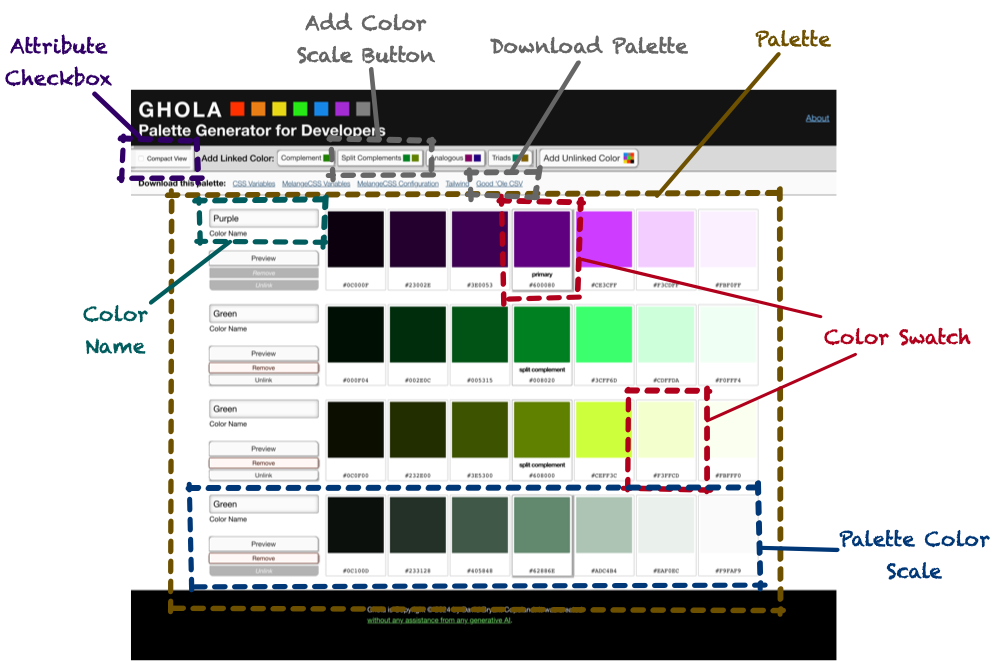
Here is a shrunken-down picture of Ghola with the custom elements highlighted:
Color Swatch - shows a color, possibly editable, possibly derived from another swatch
Color Name - shows the color name, and allows changing it
Palette Color Scale - the shades of a base color
Palette - holds one or more Palette Color Scales
Attribute Checkbox - sets or removes an attribute on another element when checked
Add Color Scale Button - adds a color scale to the palette
Download Palette - creates a programmatic/structured representation of the current palette
Note that most of Ghola is server-rendered from a single .html file. When you add colors, markup on the page is cloned, and this
is generally the only dynamic markup-generation that’s happening.
<g-color-swatch> Element
Custom elements must start with a letter and have one dash in them, so I prefixed all mine with g-. This seems logical because
as an app gets more complex, you may run into naming issues. Having some sort of namespacing seems wise.
The color swatch is the core to making everything work. The element wraps zero or more other elements and, depending on what’s
inside, the custom element will add behaviors.
At it’s most basic, it allows choosing a color and reflecting that color back to a label inside the element:
The hex-code attribute will cause the input inside to receive it as its value. Additionally, a <code> element is added
inside the label and it’s textContent is the hex code itself. When the input is used, the new value replaces the custom
element’s hex-code value. When this happens, the hex-code-change event is dispatched.
The element need not contain form controls, however. The backgroundColor of any element with a data-color attribute will be
set to the value of hex-code. The hex code itself will be inserted into any element with the data-hexcode attribute:
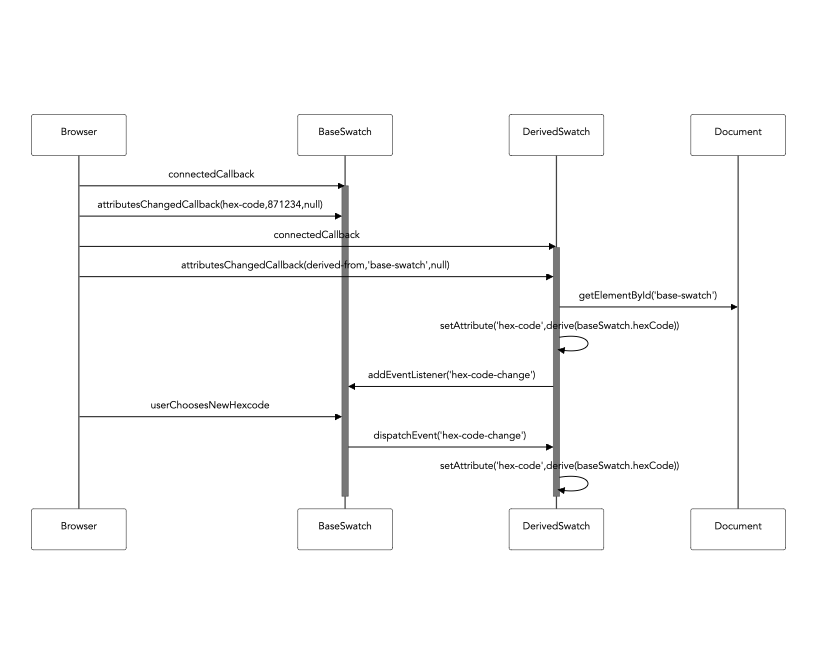
This second use case isn’t super compelling until we learn that hex-code can be omitted in favor of derived-from. If
derived-from is set, this is the id of another g-color-swatch whose hex-code is used as this element’s hex-code:
Now, when the first <g-color-swatch>’s hex-code is changed, the second one is automatically updated. Meaning: the background
color of the first <div> will always reflect the color of the first swatch.
Still, this isn’t quite that interesting until we learn that derived swatches can show the derived-from swatch’s color modified
by a derivation algorithm, of which there are a few:
brightness - used to make the different shades
complement - to show the complementary color
split-complement-upper and split-complement-lower - to show the split complementary colors
analogous-upper and analogous-lower - to show the analogous colors
triad-upper and triad-lower - to show the other colors in the triad.
These are specified via the derivation-algorithm attribute. If brightness is used, either a brighten-by or darken-by attribute is required to specify how much change should be done.
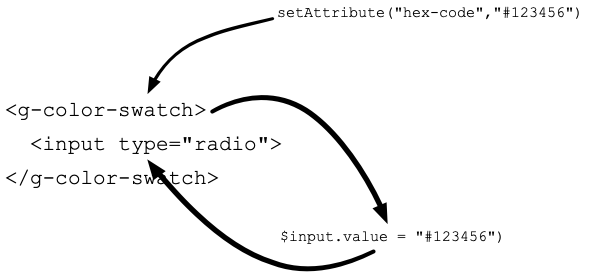
Choose an algorithm, then change the color. The derived swatch will show the updated derivation. Note the JavaScript code here:
it’s just using browser APIs like setAttribute.
From this building block, much of the other behavior of Ghola can be created with only markup.
However, Ghola has to work a certain way. One part is to be able to name a color.
<g-color-name> Element
Since the palette is ultimately destined to be used in code, the color scales need names, like “Red”, “Gray”, or “Purple”. The
color name component is how this is handled. By default, it will show a color name based on the hue of the related color swatch.
The <g-color-name> will find an input and set its value to the system-defined color of the swatch with the id given to
the color-swatch attribute.
As you change the swatch, the input’s value is reflected with the correct system-defined name. But, if you edit the input,
this behavior will stop and the user-provided name is kept. And, if this happens, the input will have data-user-override set
on it, allowing you to change the styling.
Note that if you modify the value, the italicized “(overridden)” label is shown. No JavaScript required!
Of note, this was the first point at which utility CSS didn’t quite work. One thing I like about utility CSS is when you do have
to apply it in code, it has nice benefits - you can see what behaviors are being added without taking a trip to a .css file.
element.classList.add("flex","flex-column")
Of course, not having to write any code is actually better. Even though a selector like label:has(input[data-user-override]) span is kinda gnarly, it’s better than writing JavaScript to detect when to apply or remove classes.
Now, with a swatch and a name, it’s possible to create a scale of various shades of a base color.
<g-palette-color-scale> Element
The color scale of the palette has a base color and then one or more shades darker and lighter. With raw HTML and the
<g-color-swatch> custom element, this can be done, but I wanted to have a simpler way of doing this. I wanted a custom element
to enhance other custom elements inside itself.
For example, I wanted to be able to say <g-palette-color-scale linked-to-primary="complement"> and have:
the base swatch inside be derived-from whatever the primary base color in the palette is.
have the other swatches show brighter and darker shades of the base.
And, I didn’t want to have to write JavaScript each time to set ids or manually tweak percentages of brightness.
I settled on three forms of this component:
<g-palette-color-scale primary> - this is used exactly once to indicate which scale contains the palette’s primary color.
<g-palette-color-scale linked-to-primary="«link algorithm»"> - this would set the base swatch to be linked to the primary based
on the given algorithm, e.g. “triad” or “split-complement”.
<g palette-color-scale> - this is an unlinked color that can change independently of the others.
Regardless of the form, each set of swatches inside would be modified to show a scale from dark to bright. There had to be an odd
number (so that the middle could be selected as the base). The brightness and darkness was governed by a scale-algorithm
attribute that could be linear or exponential. I always used exponential as this result in my desired set of shades, but
linear was easier to build as a test of the concept, so I left it in.
This component also had support for the preview, remove, and unlink buttons:
Preview, when clicked, would dispatch an event that could be listened for and given the scale’s hex values.
Remove, when clicked, would remove the custom element from the DOM (as well as dispatch an event).
Unlink, when clicked, would remove the attributes from itself so it was no longer derived from the primary. If the base color of
this element was an input, that input would become enabled. An event was also dispatched in this case, too.
Like the other elements, if these buttons weren’t present, that was fine and this behavior just didn’t happen.
Now, from here the entire thing can be wrapped in a palette component.
<g-palette> Element
The palette component has three main responsibilities: first, it provides a programmatic way to add a new <g-palette-color-scale>.
Second, it provides programmatic access to the current state of the palette, i.e. what are all the hex codes, scales, and names.
Lastly, it handles launching the preview dialog.
The thorniest behavior is in adding a new scale, and this is the only component that generates significant markup dynamically. When
asked to add a new scale, it copies the markup for the primary scale. It then modifies the ids within so that it is independent
but still internally consistent. The fine details of this are discussed in the code walkthrough.
Scales are added, however, by the <g-add-color-scale-button>.
<g-add-color-scale-button> Element
This custom element wraps a button and takes over that button’s behavior. It listens for the button’s click and, when it happens, locates the palette with the id of its palette attribute, then programmatically asks it to add one or more new scales using the algorithm specified by its link-algorithm.
Notice in the CodePen that the markup for the button contains two <g-color-swatch> elements, derived from the base. They are showing the two
triads and, if you change the primary swatch, the button will change, too. I used this in Ghola’s UI to give a preview of what
would be added by those buttons.
This wasn’t a feature I planned, but it fell out of the design of the custom element. Since that element can be wrapped around
anything with a data-color element, it was trivial to add a nice bit of UI fun. Neat!
Ghola allows downloading the palette, too.
<g-download-palette> Element
This element wraps a link and intercepts its click event. When the link is clicked, it locates the palette specified by its
palette attribute, then uses a class based on its generator attribute. That class will implement blob() to return a blob
suitable for use in URL.createObjectURL().
This worked by asking the palette for all its color scales, and using the name and shades to produce the right values.
The last component you can see on the main screen is the checkbox that triggers compact mode.
<g-attribute-checkbox> Element
I tried very hard not to make generic, reusable components, because this usually involves more complexity than is needed. In this
case, however, it seemed easier to make it more generic. This component wraps a checkbox element and intercepts its state. It
accepts an element attribute, expected to be the id of another element, and an attribute-name attribute.
When the interior checkbox is checked, the element the id from element has the attributed named from attribute-name set to true. When the checkbox is unchecked, the attribute is removed.
I used this to add or remove the compact attribute to the <g-palette>, then drove the visual appearance of compact mode
entirely in CSS. This was far simpler to achieve than having each component modify its behavior or appearance programmatically.
As an interesting aside, this demonstrates a flaw in using nothing but utility-based CSS a la Tailwind, Tachyons, or my own
MelangeCSS. The only reasonable way to achieve it without writing CSS would be to write JavaScript to add or remove classes
programmatically. My initial attempt at Ghola did, in fact, do this, and it was highly complex.
There are a few more elements used for previewing.
Custom Elements for Previewing
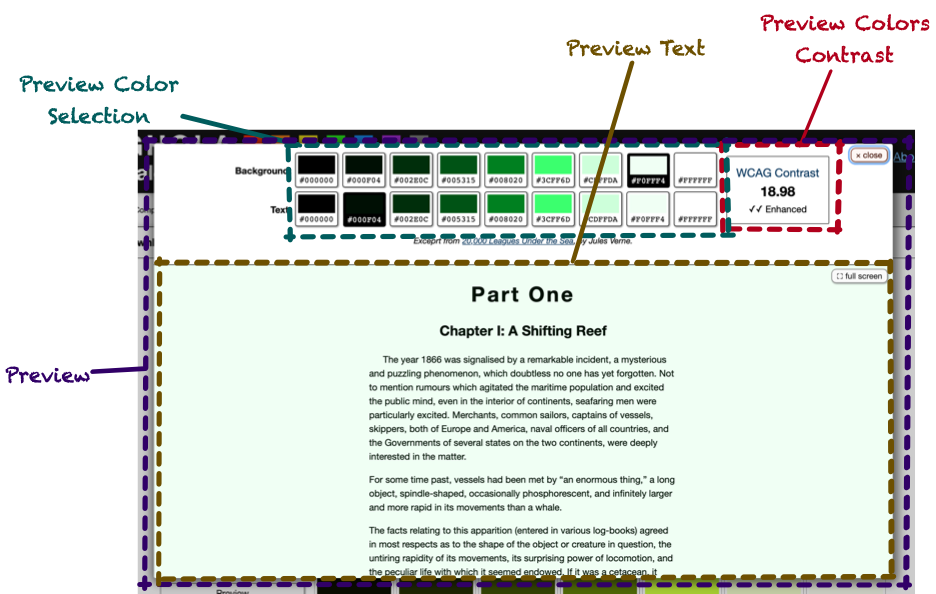
I wanted to be able to preview a color scale so you could see how text would look and see basic color contrast calculations.
Preview Color Selection - radio buttons to choose the text and background colors.
Preview Text - shows the text being previewed in the chosen colors.
Preview Color Contrast - based on the chosen colors, show the WCAG contrast ratio, along with an indicator if it was not
sufficient, minimally sufficient, or “enhanced”.
<g-preview> Element
This was pretty simple: it is programmatically given a color scale and passes it onto the components inside it.
<g-preview-color-selection> Element
This was a bit of a weird one, but it capitalized on how <g-color-swatch> worked. The markup would be two sets of radio buttons, one set for text and one for background. Each set would have one button for each hex code in the scale, plus one for black and another for white. In Ghola, this meant 9 total buttons in each set.
Since the value for hex-code is reflected in any input inside a <g-color-swatch>, the <g-preview-color-selection> could
iterate over the color swatches setting their hex codes to the values of the scale. The <g-color-swatch> elements, wrapping
radio buttons, would generate radio buttons whose value was the hex code.
This meant that if you listened for the radio button’s change event, event.target.value would be the hexcode, since
<g-color-swatch> would’ve set it. Meaning: these radio buttons can be used exactly as you would normally use a radio button,
without having to worry about the fact that they are enhanced by <g-color-swatch>.
The preview text and color contrast components could then listen for standard events from form elements.
<g-preview-text> Element
The preview text is hard-coded HTML (an excerpt from 20,000 Leagues Under the Sea), but it accepts text-color and background-color attributes that will set the color and backgroundColor styles accordingly. It also accepts a form attribute, which is the name of a form whose elements can cause the text-color and background-color to change.
The custom element then listened for a change event from any element inside the form. If the event came from an element whose
name was either text-color or background-color, it would update its own attributes to match. This would then cause the text
and background colors to change with the form.
Note that nothing about this has anything to do with Web Components or custom elements. Yet again, it’s just basic browser API
stuff.
The contrast component works similarly.
<g-preview-colors-contrast> Element
This component works just like <g-preview-text>, but it calculates the WCAG contrast ratio between the two values. It looks for a
data-ratio element, and sets its textContent to the ratio. It then locates elements with attributes data-enhanced,
data-minimal, and data-insufficient, and shows or hides them based on the ratio.
Here’s a demo that doesn’t require additional JavaScript beyond what’s implementing the elements. Since the element gets its values from any named form that has text-color and
background-color, it can be paired with <g-color-swatch> elements and just work.
And with that, the app could be put together. All of the components described create the app, but that’s not all the code there
is.
Saving State
I wanted the query string to be updated with whatever information was needed to allow permalinks to specific palettes. That meant
including the hex code of the primary color, along with the hex code of any unlinked colors. It also meant including which linked
algorithms were used and the names used, if the user had overridden them.
On the one hand, this is easy enough to do with the history API and pushState. But, knowing what the push and how to handle
popstate were more challenging.
First, there had to be an event for every change in the palette so that those events could trigger a pushState event. I handled
that by having the <g-palette> dispatch a palette-change event, and it would sort out what actions from the components it
wrapped constituted a palette-change. The event receiver could call methods on the custom element to access the palette’s values.
Trickier was what to do on a pop state, i.e. when a user hit the back button. I hate when web apps break the back button. But, to
handle it without a page refresh would’ve required basically destroying the entire page and rebuilding it. This was tricky, so I
ended up using the query string as the state and refreshing the page on back. Not perfect, but as long as GitHub Pages is fast
enough, it should be OK.
With that out of the way, let’s look at some code!
Code Walkthrough
The simplest component to start to understand is <g-attribute-checkbox>. This will lead to some of the re-usable stuff I
extracted and see the overall structure that the other components also have.
I’m not putting a TOC for this section as you need to read the entire thing to see the evolution of the basic API to the (minimal)
reusable code I ended up with.
<g-attribute-checkbox>
As a custom element that has custom attributes, the following code has to exist in some form:
classAttributeCheckboxComponentextendsHTMLElement{staticobservedAttributes=["element","attribute-name","show-warnings",]connectedCallback(){// Called when added to DOM}attributeChangedCallback(name,newValue,oldValue){// Called when attributes change, REGARDLESS// of connectedness.}}customElements.define("g-attribute-checkbox",AttributeCheckboxComponent)
I eventually extracted a few patterns into a base class, but let’s see how this component works without that, so we can build up
to what I did—and did not—abstract.
The tricky thing about custom elements is you can’t make that many assumptions about the state of the DOM, in particular when
attributeChangedCallback is called. You need to be very defensive and query for DOM elements only when it makes sense.
I did assume that my code would be run after DOMContentLoaded had dispatched. But, you can’t really assume that your attributes will
have been set, especially since they can change after the page is first rendered.
This means that code like this—which I have seen in a lot of tutorials—won’t necessarily work:
This code is still a bit too naive. If attribute-name is changed, you’ll end up with a second event listener on the internal
checkbox, and you’ll set both the new attribute-name and the old one. And, if the checkbox is changed programmatically, this
won’t trigger the change event, so your checkbox and related element will be out of sync.
To deal with the multiple listener issue, I pulled the code into an instance variable. That way, subsequent calls to
addEventListener wouldn’t add more than one listener. The listener uses whatever element is set up and whatever attribute is
configured at the time the listener is called.
As you can see, attributeChangedCallback needs to invoke the logic of the listener, and it’s kinda janky to call the listener
by creating a fake event. So, I extracted the bulk of the logic into _updateElement():
To handle the issue of programmatic access, I wanted callers to be able to do element.check() or element.uncheck() and have
that check/uncheck the checkbox and then trigger the element’s logic.
What I realized would make this easier was a central method to execute whatever logic the element needed. Even though the element isn’t necessarily rendering its entire innards, I called the method render()
This led to the basic design of all the custom elements:
connectedCallback() and attributeChangedCallback() would set up any internal state and call render()
render() would idempotently perform any logic, DOM updates, or other work needed to make the component work. It should always
be safe to call at any time and should always behave properly, given the state of the element.
This proved to be much easier to do than trying to build smarts into each method to figure out what work needed doing based on the
change or lifecycle activity that was triggered.
There were other patterns I was seeing across my components.
Disconnected Components Still Exist
I noticed that after a component disconnected, attributeChangedCallback could still be triggered. And, of course, any code with
access to the component could programmatically call methods on a disconnected component. Thus, it would handy if render would
not run after disconnectedCallback was called.
Next was the somewhat complicated call to define an element.
Defining the Element and Accessing its Tag Name
Even though customElements.define("g-color-name",ColorNameComponent) isn’t that bad, I did end up writing code like this.querySelector("g-color-name"). Since this duplicated the custom element names, it meant if I changed the element name, I had to hunt down all the query selectors.
I ended up standardizing on a static tagName attribute, so I could
do, instead, this.querySelector(ColorNameComponent.tagName). This also created a natural dependency in the JavaScript code
between components. Instead of getting null back, I’d get an error that tagName wasn’t defined.
With this tagName property, I created a static define() method:
The last pattern I was seeing was messy attributeChangedCallback methods. They were basically a bunch of if statements. I
considered implementing attributeChangedCallback in a base class to just set property names directly, but that created a public
API for these properties that I didn’t want anyone to use. I realize that setAttribute("value",value) and element.value =
value do have different behavior in the built-in elements, but I didn’t want to make a public API out of every observed element.
Instead, I implemented attributeChangedCallback in a base class that deferred to subclass methods that conformed to a certain
convention.
One Base Class to Rule Them All
I called my base class BaseCustomElement to make it as obvious as I could what it was. Here is how
attributeChangedCallback looks:
attributeChangedCallback(name,oldValue,newValue){constcallbackName=`${newRichString(name).camelize()}ChangedCallback`if(this[callbackName]){this[callbackName]({oldValue,newValue})}elseif(this.constructor.observedAttributes.indexOf(name)!=-1){console.warn("Observing %s but no method named %s was found to handle it",name,callbackName)}this.__render()}
RichString is a junk drawer class I keep around that, among other things, turns hex-code into hexCode. Thus, you can see
that attributeChangedCallback(name,oldValue,newValue) will call «attributeNameInCamelCase»ChangedCallback({oldValue,newValue}).
I retained ChangedCallback in the method name to make sure it was clear that this was related to the custom elements lifecycle method. I used named
parameters to allow the callback methods to opt out of oldValue, which I almost never needed.
This meant that attributeChangedCallback from AttributeCheckboxComponent could be removed in favor of these two methods:
attributeNameChangedCallback({newValue}){this.attributeName=newValue}elementChangedCallback({newValue}){if(newValue){this.element=document.getElementById(newValue)if(this.isConnected&&!this.element){this.logger.warn("No such element in the document with id '%s'",newValue)}}else{this.element=nullthis.checkbox.removeEventListener("change",this.checkboxChangeListener)}}
(I’ll discuss this.logger.warn below)
BaseCustomElement also had the define() method, as well as implementations for connectedCallback() and
disconnectedCallback():
I didn’t super love preventing the subclasses from implementing the standard connectedCallback and disconnectedCallback methods, but this seemed the easiest way to set the flags needed to implement __render, like so:
Note that the double-underscores were there to remind me that they are private to BaseCustomElement. I’m not sure of a better
pattern.
With a centralized base class, I could also provide a way to manage warnings
Warnings, Silent Failure, and Debugging
As I mentioned, custom elements should not emit warnings or errors, and should be defensive. For example, if the
AttributeCheckboxComponent didn’t find a checkbox inside it, it should just not do anything (vs throwing exceptions).
That said, it’s nice for debugging to be told that you are using an element incorrectly.
I decided to manage this by looking for the attribute show-warnings. If this was set, the component could check this and emit
console messages if something was wrong or misused.
To avoid having tons of if (this.showWarnings) statements everywhere, BaseCustomElement would provide this.logger, which wrapped console.log. BaseCustomElement would implement showWarningsChangedCallback which, due to the implementation of attributeChangedCallback, would be called when show-warnings was set on the element (assuming the element’s subclass put it into observedAttributes)
The Logger would have the concept of a prefix that would be prepended to all messages, so you’d know what instance messages were coming from. The null prefix would mean “don’t log anything”, and would be the default behavior.
If show-warnings was present on an element, either its value or the element’s id would be used for a prefix, triggering another
implementation of Logger that would actually output warnings:
Note the last call to this.logger.dump. The “null” logger would retain its messages and dump them if logging was turned on after
the component was created. This happened if the attributeChangedCallback('show-warnings',…,…) was called after other attributes
were set, and those calls generated warnings.
Now, any element can check for warnings and not litter the console with them by default, but see them if needed.
Here’s an example where a <g-color-swatch> has no input or data-color. Open the JavaScript console to see the warnings.
The warning will show up in the console. If you remove show-warnings, it goes away.
BaseCustomElement may seem like a lot, but it’s only 67 lines of code long, excluding comments. I namespaced it in the folder brutaldom as an ode to Brutalism, a style of architecture that adheres to “truth to materials”.
To me, the advantages of Web Components and custom elements is that you are using the browser’s API directly, not through some
leaky abstraction. While my BaseCustomElement is a form of abstraction, it takes great pains to make sure it’s very obvious what
it’s doing and how it works. Just like a lot of Brutalism.
With this base class in place, AttributeCheckboxComponent is pretty straightforward. And, if you don’t know what is in BaseCustomElement, but you do understand the custom elements API, you can have a pretty good guess what elementChangedCallback and tagName are doing.
Let’s jump even deeper and look at the code for the color swatch element, as this is the most complex.
<g-color-swatch>
As discussed above, the general API of this element is:
Attributes
hex-code - The hex value to show
derived-from - ID of another color swatch to use as the color, instead of hex-code
derivation-algorithm - the algorithm to derive our color from the other color
darken-by - If derivation-algorithm is brightness, what % darker should we be?
brighten-by - If derivation-algorithm is brightness, what % brighter should we be?
show-warnings - Should we show warnings (see above)?
default-link-context - Is there additional context to show inside the element somewhere?
Events
hex-code-change - dispatched if the hex-code attribute was changed, which can happen when any inner input’s value has changed, when a new value is derived, or someone calls setAttribute('hex-code',…) or removeAttribute('hex-code') on us.
Properties
hexCode - a getter that returns the current hex code. If this swatch is deriving its value from another swatch, hexCode will return that value.
Let’s start with render which, as you recall, is responsible for doing whatever needs doing based on the element’s attributes
and contents.
First, it must connect its value to any input elements it finds inside itself. And, in order to provide a good warning when
show-warnings is set, it will warn if our value is derived from another, but an editable input is found, since this would create
confusing behavior:
render(){constnumInputs=this._eachInput((element)=>{element.value=this.hexCodeelement.addEventListener("change",this.onInputChangeCallback)constdisabled=element.getAttributeNames().indexOf("disabled")!=-1if(!disabled){if(this.derivedFromId){this.logger.warn("derived-from-id is set, but an enabled input was detected: %o",element)}}})
_eachInput exists to return the number of inputs found so we can give a warning:
Next, render must set the background color for any data-color elements. After that, it will warn if it didn’t find any inputs
or any data-color elements:
constnumDataColors=this._eachDataColor((element)=>{element.style.backgroundColor=this.hexCode})if((numDataColors==0)&&(numInputs==0)){this.logger.warn("There were no <input type=color> nor [data-color] elements found")}
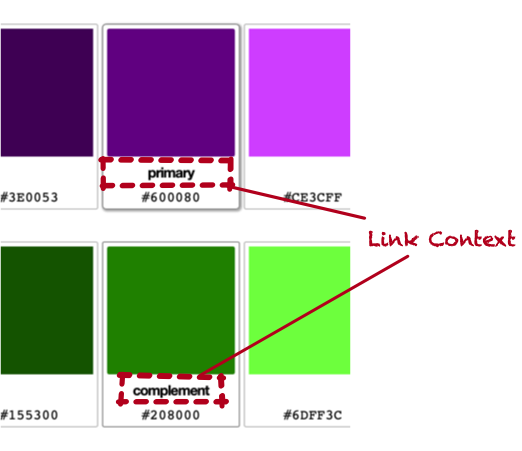
Next, we set up the “link context”. This is where Ghola shows “Primary”, or “Complement” in the UI. The <g-color-swatch> has a
notion of a “default” link context to show if no linking algorithm is set. This is almost entirely used to show the label
“Primary”.
_updateDerivationifNeeded is a bit gnarly. Basically, if we are deriving from another swatch, and the element is a
<g-color-swatch> and has a hexcode, update our derivation. There is a complication around the flag
whenHexCodeExists.
In some contexts, we don’t want to execute this code if we already have a hexCode value. render() is
such an occasion. This is because the derivation will ultimately call this.setAttribute("hex-code",…), which triggers render() and
thus an infinite loop.
That said, if darken-by, brighten-by, or derivation-algorithm change, we need to recalculate our hex code even if we already
have one. Whew! Here it is:
_updateDerivationifNeeded({whenHexCodeExists}){constderivedFromElement=this.derivedFromElementconsthexCodeExists=!!this.hexCodeif(derivedFromElement){if(derivedFromElement.tagName.toLowerCase()==this.constructor.tagName){derivedFromElement.addEventListener(this.hexCodeChangedEventName,this.onDerivedElementChangeCallback)if((derivedFromElement.hexCode)&&(whenHexCodeExists==hexCodeExists)){this._deriveHexCodeFrom(derivedFromElement.hexCode)}this._eachLinkContext((element)=>{element.textContent=this.derivationAlgorithm.humanName})}else{this.logger.warn("Derived element has id '%s', but this is a %s, not a %s",this.derivedFromId,derivedFromElement.tagName,this.constructor.tagName)}}}
Note that we warn if the derived ID is not a color swatch. In that case, the element should do nothing, but debugging this was
difficult, so the warning was really helpful here when I got the ids wrong.
Also note that we override the “default link context” with the name of the derivation algorithm. This allows us to have a place
for this information, and set a reasonable value if it’s not there.
Where does this.derivationAlgorithm come from? That’s clearly not a string. It’s setup by BaseCustomElement’s
attributeChangedCallback, which will call derivationAlgorithmChangedCallback. It looks like so:
derivationAlgorithmChangedCallback({newValue}){this.derivationAlgorithm=DerivationAlgorithm.fromString(newValue)if(this.derivationAlgorithm){this._updateDerivationifNeeded({whenHexCodeExists:true})}elseif(!!newValue){this.logger.warn("derivation-algorithm '%s' is not valid",newValue)}}
DerivationAlgorithm takes the string (which is the value of the derivation-algorithm attribute) and locates a class. Note that
if we find such a class, we call _updateDerivationifNeeded and tell it to do so even if we already have a hex code, since the
change in derivation algorithm likely means our hex code will change.
Here is an example of a derivation algorithm that derives the complementary color:
The “H” in HSL is the hue, and it’s a value along a 360 degree circle. The complement is the value opposite of it on that circle.
OK, that is a deep dive, but render() is still not done! We have to put the hex code on any labels or data-hexcode elements.
We have to take care to clear out the value if we don’t have a hex code. This prevents an older value from sticking around if
the hex-code attribute was removed.
_eachCodeElementInsideRelevantLabel is quite long, because it must locate any label that is relevant, but not locate labels
that label other things. It also handles the data-hexcode case. In both cases, it looks for a code element. If it finds one,
that element’s textContent is set to the hexcode. This allows the hex code to be styled and placed precisely.
If there is no code element, one is created.
_eachCodeElementInsideRelevantLabel(f){this.querySelectorAll("label").forEach((label)=>{letinputif(label.htmlFor){input=this.querySelector(`[id=${label.htmlFor}][type=color]`)}else{input=label.querySelector("input[type=color]")}if(input){letcode=label.querySelector("code")if(!code){code=document.createElement("code")label.appendChild(code)}f(code)}else{this.logger.warn(`Orphaned label inside the element does not wrap nor reference a color input inside the element: %o`,label)}})this.querySelectorAll("[data-hexcode]").forEach((hexCode)=>{letcode=hexCode.querySelector("code")if(!code){code=document.createElement("code")hexCode.appendChild(code)}f(code)})}
And that’srender. This covered most of the class, actually. Creating an idemopotent method to do whatever needs doing isn’t
always easy. One note is when the value of derived-from is changed
from the ID of an element to something else. That other element isn’t being removed from the DOM, so if we continue to listen to
its hex-code-change events, things will get confusing. So, we have to call removeEventListener:
Remember, this is called by BaseCustomElement’s attributeChangedCallback implementation. Also remember that
removeEventListener only works if you have the exact listener you provided. That means we have to hold onto the listener in
order to call this and it can’t be an anonymous function declared inside another method.
We set this up in the constructor and here’s what onDerivedElementChangeCallback looks like:
this.onDerivedElementChangeCallback=(event)=>{if(event.target!=this.derivedFromElement){this.logger.warn("Got an event from not our derived")}this._deriveHexCodeFromSwatch(event.target)}
You can tell that I initially forgot to removeEventListener and was pretty confused by what was happening. I put that if
statement in at first to try to debug where the events were being triggered from.
Note that I don’t need to do this when this element is disconnected, because in that case, the element is going away so the events being sent don’t really matter. But, I could’ve put some logic in BaseCustomElement to remove all event listeners.
Whew! That was a doozy, but a few themes are here that show up in all the other elements:
Handle the presence and absence of values explicitly
Be very careful when setting your own attributes, so you don’t create a cycle. Even without my render abstraction, it can be
very easy to have attributeChangedCallback trigger some code that calls this.setAttribute, which will then call
attributeChangedCallback.
Be very liberal handling whatever elements you find. You cannot require that your element contain other elements without having
your element render itself. Instead, just do nothing if you can’t do anything. But provide a way to warn/debug.
Be aware of listening for events from other elements. Just because you are being disconnected from the DOM doesn’t mean they won’t
still dispatch events to you.
I’d also like to point out something very very nice about all this code. Do you see any Promises? Do you see the async or
await keywords? I sure don’t. It’s a nice place to be.
Let’s look at PaletteComponent next, because that’s the only component that did significant DOM manipulation and it was tricky in
the face of the way in which components are connected.
<g-palette>
I’m not going to go through the entire component, but as an overview, here is how it works:
Attributes
show-warnings - Should we show warnings (see above)?
save-state - if set, save state in the query string. This needs to be turned off when a test needs to use this component.
Events
palette-change - Any time any part of the palette changed for any reason.
Properties
primaryColor - returns the base hex code for the primary color, along with its name and a boolean flag that indicates if the
user has overridden the name.
otherColors - an array of objects like primaryColor, but instead of a hex code, the algorithm name is used when a color is linked to the primary.
Methods
addScale({linkAlgorithm,hexCode}) - adds a new scale to the palette. This is the method we’ll review here.
Let’s dig into addScale. This is called by a <g-add-color-scale-button> to add a linked or unlinked color to the palette. This
method basically needs to:
Ensure there aren’t two colors linked by the same algorithm (e.g. only at most one complementary color is present)
Clone the primary node
Change any ids to ensure the new node is internally consistent and not referencing anything from the primary
Trigger behavior after the element is added
Set up listeners to the new scale’s events to know when to dispatch palette-change events
Let’s take the first bit, up to cloning the primary:
addScale({linkAlgorithm=null,hexCode=null}={}){constprimary=this.primaryColorScaleif(!primary){this.logger.warn("Palette has no primary color scale, so there is no reference to duplicate when adding a new scale")return}if(linkAlgorithm&&this.querySelector(PaletteColorScaleComponent.tagName+`[linked-to-primary='${linkAlgorithm}']`)){return}constnewScale=primary.cloneNode(true)
Even though Ghola always has a primary <g-palette-color-scale>, there’s no reason this code has to bake that assumption in, so it
exits early if we can’t find it. Next, we make sure that if we are creating a linked scale, that we don’t already have that one
set up. Then, we clone the primary node.
The primary node will be a <g-palette-color-scale>, and if we ask its tagName, that’s what we’ll see. But, crucially, if we
ask for its constructor.name, sometimes we’ll get HTMLElement, and notPaletteColorScaleComponent, which is the class it should be.
This was super weird to wrap my head around. Setting attributes at this point will trigger attributeChangedCallback. I had a
hard time recreating this in a CodePen, and I think it must be some sort of situation where the element had not yet been defined
when the code ran.
Still, the next bit gets odd. A feature of <g-palette-color-scale> is that it will generate an id for the base
<g-color-swatch> in order to connect the brighter/darker swatches to it. To force that to happen on a new node, we have to clear
the existing id. We also clear default-link-context which, on the primary is Primary.
If our new scale is using a link algorithm, we want to disable any color inputs in the cloned scale. This prevents the user from
editing them, but allows editing to be re-enabled later, if the scale should be unlinked.
Lastly, we remove the derived-from element from all the new swatches, since <g-palette-color-scale> will set them to whatever
id it generates for the base color swatch:
The next bit of code will set up the link between the primary and the new scale, if there is a link algorithm. If there’s not, it
will set hex-code directly, thus creating an unlinked scale. If no hex code was provided a random value is used:
Notice this comes after it’s been appended to the DOM. I am not sure if this is strictly required, but I definitely had some odd
behavior trying to set these attributes before the call to appendChild. I’m certain it’s because of something I am doing, but
given that the documentation around custom elements is not great, it’s hard to know what to expect, specifically.
Moving on, we need to reset the <g-color-name> component inside the cloned scale. After the clone, it’s still pointing to the
primary scale’s base color swatch and we want it to point to the new scale’s base color swatch.
Note the defensiveness of changing only the <g-color-name> that references the primary’s base color swatch.
Lastly, we dispatch a palette-change event and hook ourselves up to the newly-created scale’s events:
this.dispatchEvent(newCustomEvent("palette-change",{cancelable:false,bubbles:true}))this._addScaleEventListeners(newScale)returnnewScale}// end of render()_addScaleEventListeners(scale){scale.addEventListener("base-color-changed",this.colorChangeEventListener)scale.addEventListener("unlink-from-primary",this.colorChangeEventListener)scale.addEventListener("remove-scale",this.colorChangeEventListener)scale.addEventListener("name-change",this.colorChangeEventListener)scale.addEventListener("name-cleared",this.colorChangeEventListener)scale.addEventListener("preview-scale",this.previewScaleEventListener)}
I went through this to point out some potential complexity in dynamically generating custom elements that reference other elements.
It’s extremely powerful to allow one element to connect to another, but when duplicating or cloning elements, great care must be
taken to set all attributes—and any inside—to blank or updated values.
Another option would’ve been to use a template and clone from that. That operation could be wrapped in a method that accepted
parameters for all ids and attributes, so there’s no worry about resetting, changing, or overwriting any values. I chose not to do
this because it would’ve either duplicated the existing markup in the static index.html file or required the very first color
to be rendered dynamically and I didn’t want to do that.
Whew again! Despite the length of this post, if you go back and look at the code, it’s really not that complicated. Once you
are oriented to the browser’s APIs and the way Ghola works from the user’s perspective, it’s not hard to follow along. There’s not
a lot of odd metaprogramming, strange callbacks, async inception, or anything all that confusing.
That all said, I needed a way to test this.
Testing
My approach to writing code is to just get things working—even if by copy and paste or other terrible means—then clean it up. It
separates the “how do I get this to work?” from “what’s the right way to use this?”. I had been just clicking around and making
demo pages to verify my elements were working, but it was tiresome. I needed tests.
I cruised through the usual suspects of Playwright, Cypress, and Capybara. My heart just sank thinking about setting these tools
up. They are just so painful to use. My experience—over many years of using them—is that a not-insignificant portion of my dev
time would be figuring why the tests were failing on code that I could verify by-hand was working.
The core problem with these tools is that they don’t expose the browser APIs to test. They also come with convoluted build steps,
brittle toolchains, and a hodge-podge of selector and assertion libraries, all written in some sort of pidgen English that
never really makes sense to me.
There are unit-testing things like testing-framework that are pretty much the same pile of unstable tooling and broken
abstractions, but then don’t even run in the browser where my code will run.
I don’t have a solution here, but yes, I made my own test framework that runs in the browser. It’s 300 lines of code, has almost no API and runs super fast. It’s not without issues, but here is how it works.
Make an HTML page that will contain your test cases. Each test case is surrounded by a custom element named <g-test-case>. It
should have an id.
The custom element should contain a <g-test-subject> which will contain all the markup available for your test.
Create a JavaScript file that brings in the function testCase.
Call testCase with the id from <g-test-case> and a function.
The function will be given functions as arguments you can use to create tests. One of them is test.
Here is the test for the <g-preview-text-component>.
First, the HTML:
<g-test-caseid="preview-text-colors"><g-test-case-subject><g-preview-textclass="db"background-color="#000000"text-color="#ffffff"><h1>CHAPTER II</h1><h2>A NOVEL PROPOSAL OF CAPTAIN NEMO’S</h2><pclass="p">
On the 28th of February…
</p><pclass="p">
Captain Nemo…
</p><pclass="p">
“The Island of Ceylon…
</p><pclass="p">
“Certainly, Captain.”
</p></g-preview-text></g-test-case-subject></g-test-case>
The test code starts off importing testCase:
import{testCase,}from"../brutaldom/testing"
The basic design of what I created is that you pass a function to testCase. That function’s argument is an object that will be
filled in by the test framework. You would use named parameters to indicate which of the object’s keys—i.e. injected functions—you
need for your test.
When the function you pass to testCase is called, the following parameters will be passed, as keys in the single-object argument:
setup - use this to declare pre-test setup
teardown - use this to declare post-test teardown
confidenceCheck - use this to check test pre-conditions
test - use this to write a test
assert - does what you’d expect
assertEqual - does what you’d expect
assertNotEqual - does what you’d expect
The test case here doesn’t need confidenceCheck or assertNotEqual, so those are not listed as parameters.
Most setup calls look something like this. The test could operate directly on the markup in the HTML file, but it’s often handy to make a copy and test on that, so you have a clean place to start. I’m sure this could be genericized, but I didn’t do that. Instead, setup uses clone to copy the first child of its subject, in this case the g-preview-text element that’s going to be
tested.
It’s then added to the body. The return value of setup’s function is important. Whatever is returned is passed into the
function given to test (as well as to confidenceCheck and teardown). Here is teardown:
Because the function given to setup returned {$previewText}, that is available to the function given to teardown (which removes the node from the document).
Now, let’s look at a test.
In this case, there’s no action, because the test is assuming the attributes set in the HTML are what they are, so it’s checking
that those attributes flowed through to the style:
test("the attributes flow to the styles",({$previewText})=>{assertEqual("rgb(0, 0, 0)",$previewText.style.backgroundColor)assertEqual("rgb(255, 255, 255)",$previewText.style.color)})
Other than assertEqual, this is using the browser’s API. There’s no selector framework to hunt down, no lectures about how to
locate elements in some morally-pure way, no DSL to hope is documented and updated. Just the browser’s API which a) you are
already using and b) is how these components are used in the real world.
Next, we test that if the attributes are removed, the component uses reasonable defaults:
test("removing the attributes sets reasonable defaults",({$previewText})=>{$previewText.removeAttribute("background-color")$previewText.removeAttribute("text-color")assertEqual("transparent",$previewText.style.backgroundColor)assertEqual("currentcolor",$previewText.style.color)})
Note also that because we are using the browser’s API inside a browser, we don’t have to put async everywhere. We have no
artificially-created promises to wait on or any other nonsense.
The way the tests work is that test stores the function into a global data structure, then a test runner runs all the functions that were stored. assert and
friends raise special errors to indicate test failure. This is all collated and reported in the console. I was already in the
console a lot building this, so that was a nice place to show the output.
You can run the tests yourself by going to the components page. Click on any of the “Run
Tests” links and open up the console.
The other nice thing is that the markup is right there. You can interact with the exact test case to see why something isn’t
working (or comment out your removeChild to leave the test markup hanging around). This is way nicer than hoping headless
Chrome takes a screenshot or records a video.
It also means you can, you know, see the HTML of your test when things go wrong. That none of the browser-based testing
frameworks do this by default (and most don’t make it easy) is baffling to me. The HTML is the input to these tests and it’s too
difficult to view on a failure.
I did add two quality-of-life features:
If the <g-test-case>’s child is a <details>, it will open the element on a failure, but leave it closed on a pass. This lets
you see instantly which test failed and play around with it.
I also created a custom element to view the source code of an element, and used that in the test case HTML. If you open up on of
the test case summaries, you can see the source code that was input to the test. This saved me a few trips to the Elements tab in
the dev tools.
It’s also very fast. I could change a file, then reload the page and see new tests run or updated tests run. We’ll talk about the
dev environment later, but the cycle was fast. I was able to drive some features via TDD using this system pretty well.
This wasn’t all amazing, but I resisted the urge to polish this up. It has some warts:
cloneNode requires careful rewriting/changing of any ids used to connect elements. This isn’t always easy to do.
It would be nice to see results in the web page.
The only way to run the tests is to go to a web page, which isn’t great for continuous delivery.
It’s potentially brittle having an HTML page and the JavaScript tightly coupled but not co-located.
Creating a new test requires a lot of copy/paste.
This might not be great for testing higher-level workflows. Ghola’s main UI is not tested.
For this project, I was happy to not have to set up whatever JavaScript browser testing framework is popular today.
Extremely happy. But brutaldom/testing is pretty rough around the edges. Still, it accomplished its goal and served me well.
I wish more testing frameworks allowed us to use the browser directly without lectures or DSLs or leaky abstractions.
querySelectorAll works great, and to be honest, I would rather see assert(element.textContent.match(/foo/)) than
expect(element).toHaveText("foo").
I do think what I have built could be adapted to a CD workflow if it output the results into the webpage in structured markup that
a secondary process could parse. A headless browser could launch the test page, wait for an element indicating test completion,
then examine the results.
OK, what about the dev environment?
Dev Environment
The dev environment had to be reliable and stable. Other than depending on Docker, the app has very few dependencies and makes use
of core UNIX tools and behaviors that have been encased in carbonite for the last 20 or 30 years. Reliable.
While Docker isn’t as repeatable as they’d like you to think it is, it’s far easier to come
back to a Docker-based dev environment later. I have a repo named DevBox that is the
basis for all the dev environments I’ve used in the past couple years. It copies itself into your project, so if you look at
dx, you can see the scripts used to manage everything.
dx/build will build a Docker image in which development will happen.
dx/start will start the dev environment
dx/exec will run commands inside the dev environment. You can certainly do dx/exec bash to “log in”, but you can also run
any command this way.
The dev workflow is managed by a Makefile and the scripts in bin.
Dev Workflow
Examine package.json. It’s pretty minimal. The app itself has
only two dependencies:
colorConvert, which is a small library I’m using to convert hex to HSL, etc.
melange-css, a utility-first CSS framework I created that works like Tachyons and, unlike Tailwind, has no annoying build step.
That’s it! The beauty of using built-in APIs. These dependencies will be reliable and, worst case, I can inline them into the app (I used a library called html-prettify to format the HTML and basically inlined the functions I needed, since the module did not look maintained).
The dev dependencies are also minimal:
http-server to run the app locally
esbuild to package the CSS and JavaScript. I realize importmaps are a thing, but I don’t really understand how they work to be
comfortable with my app making a bunch of flaky network calls to get its code. esbuild doesn’t require configuration, runs
quickly, and seems stable.
ejs to generate HTML. Yup, good ‘ole EJS. Check out
src/html/templates/head.html for an example.
This file is <%- includeed at the top of other files to share this stuff. Super basic. Any time I needed to re-use complex
markup, I could do this. The build step for the app uses npx ejs to produce fully-formed HTML files.
chokidar-cli is used to auto-run the build step when files change.
My goal with this dev environment was to be able to run a command and have it detect changed files, then rebuild what was
necessary. I could then save my work and reload the browser.
Many JavaScript toolchains cannot do this and just rebuild everything, hoping they are fast enough to do so. I decided to use a
tool that was built for this job decades ago: make.
Oh make
If you haven’t used make, it is a tool that allows you to specify dependencies between source and destination files, and provide
commands to make a destination from a source. Here are two examples.
First, we have the way to build our JavaScript using esbuild. Earlier in the file JS_DEST_FILE is defined as site/dev/js/main.js and JS_SRC_FILES are defined as all the *.js files in src/js. JS_SRC_FILE (no plural) is src/js/index.js, which is what we input to esbuild (it uses import to bring in the other files as esbuild doesn’t need to know which specific file changed). MINIFY_JS_FLAG is defined as empty for a dev build, but --minify --keep-names for a production build.
Make is quirky, for sure. The space before npx has to be a tab. $@ represents the thing on the left-hand side of the colon. But, like any system, you can learn this stuff easily enough (or, more realistically, learn how to quickly navigate its extensive documentation).
What this code does is allow me to execute make site/dev/js/main.js. If any of the files in JS_SRC_FILES are newer than
site/dev/js/main.js, the npx esbuild command is executed. But, if site/dev/js/main.js is actually newer, nothing is
executed. Meaning: I can basically run that in a loop and it will only do something if there is something to do.
Here is another example for the HTML. In this example, HTML_DEST_DIR is site/dev/, HTML_SRC_DIR is src/html, and
EJS_DATA_FILE is ejs_data_file.dev.json.
Yes, even more weird symbols. The @ in front of mkdir prevents make from printing out the command when it’s run. The $<
represents the file on right-hand side of the colon. The reason for these indirections is that the rule—the first line with the
colon in it—is itself a template rule.
It is saying that if I want to build a file in site/dev, and there is a file with the same name in src/html that is newer,
execute this command. Essentially, this is a script for using EJS to build a destination file from a source file.
To bring this together, we might do this:
default:$(JS_DEST_FILE) $(HTML_DEST_FILES)@echo Done with $(ENV)
When I run make default, make will execute the rules for JS_DEST_FILE (which is site/dev/main.js) and HTML_DEST_FILES
(which are all the files found in src/html except renamed to be in the site/dev folder. make will then build only what
files are out of date.
This means that my build step is basically make default (or, simply make because default is the last rule in the file), and
make will build only what files have changed, i.e. perform an incremental build.
Because this needs to work for dev and for production, I wrapped a few details into
bin/build. So I can run dx/exec bin/build and build whatever is
needed for dev, or do dx/exec bin/build production to build for production.
Now Draw the Result of the Dev Workflow
The Makefile is the core logic of my dev workflow, but we also need to run a web server and, ideally, automatically rebuild
everything when any file changes. bin/run handles running the web
server, and it can run for dev or production (since this is hosted on GitHub Pages, that means running out of docs/).
bin/dev brings both bin/run and bin/build together. It uses
Chokidar to run bin/build if any file in src has changed:
It runs this in the background, then runs bin/runalso in the background, then calls wait which will sit there as long as
both commands are running. If you control-C bin/dev, the trap killgroup SIGINT causes the killgroup function to be called,
and this kills both bin/run and Chokidar.
This means that I can do dx/exec bin/dev and my app is rebuilt as I save files.
Look at the Makefile and the scripts. There is really not that much there. It’s all using basic UNIX tools that have existed
for decades for the most part. EJS, esbuild, and Chokidar have been around and are stable. This is a set-and-forget setup.
Thus, the steps to go from zero to running this app in dev are:
Install Docker
dx/build
dx/start
dx/exec bin/setup
dx/exec bin/dev
You can try this out yourself by using tleilax as a template repo.
I should also point out that this is all my second time building Ghola with Web Components. My first attempt didn’t work as well.
My First Attempt
I did attempt Ghola with custom elements prior to this. My approach was to build React-style components that rendered themselves.
Each component had a <template> it would run, and a rich programmatic interface. It was complex. Here is the color
swatch component. You’ll
note that it mixes in several modules to re-use what ended up being common functionality.
HasAttributes requires that you define a
special object in your class, and then it will declare observedAttributes and override attributeChangedCallback to set the
values on the object. If you mix this in, you can intercept attribute assignment by overriding a setter, e.g. set hexCode(hexCode) The mixin also supported wrapping the strings in types.
HasEvents was my attempt to provide a
richer API than addEventListener. It is annoying to do string-based stuff with the browser API, but I’m not sure what I did is
the best way to solve for that. You’ll note that a lot of this particular mixin uses
MethodMeasurement.
I created MethodMeasurement to help figure out why Ghola v1 was so freaking slow. This version is
availble and you will note that it’s slower, especially if you add more swatches. If you are using
Safari, the color input sends realtime change events when you mess around in the color wheel. In this original version of Ghola, the browser just dies for a while before catching up. The revised version does not.
Seeing this slowness, I figured this was a good chance to dig into the performance API to try to figure out what was going on. I
got a lot of insights into stuff, but I never could figure out why it was so slow. The web of event listeners made it hard to
track down and the abstractions I had added around it made it even harder. That could be why I resisted creating an API on top of
addEventListener for the revision.
Lastly, you can see what I created to provide a programmatic interface for hiding and showing elements.
Hideable is a monstrosity. Instead of using
CSS for this, I had elements listen for the compact checkbox’s change event, then call element.show() or element.hide().
The problem, as you can see in the _displayValueWhenShown method is that if an element is hidden by default, the JavaScript code
needs to know what value for display to give it so that it works in the design. To use Hideable, your element must declare
data-brutaldom-display to have that value. Ugh.
I will say that this version of Ghola does work - it does create shades and links colors, just like the revision does. The reason I
started over was the performance. I decided that even if the app worked, it should be fast. It was fast when I was prototyping,
so something I had done was making it slower. But I couldn’t figure out what.
So, I started over from scratch, hoping that a simpler design would be easier to understand. Maybe the revised Ghola is slow on an
older or cheaper computer, but it’s way faster than the original. So I never dug into its performance. If I have to, hopefully it
will be straightforward.
This was an insight about using frameworks like React or Angular. They create complex abstractions on top of the browser and when
you need to understand why your front-end is so slow, it becomes really hard to do that. JavaScript’s nature makes this a
generally hard problem because of source maps, callbacks, and a lack of introspection into the runtime. The dev tools performance
features may seem good, but they are incredibly hard to use and helpful documentation is scant. Add a complex set of dependencies
on top of that, and it’s no wonder most SPAs are incredibly slow.
Outlook
The custom element API did feel like an upgrade over the plain browser API. Being able to use the lifecycle hooks instead of
inventing my own is nice. When I had to add dynamic content, it was really nice not to have to bootstrap it: I added my elements
and they just worked.
Thinking in terms of making my own elements that behaved as if they were part of the browser was a useful lens in designing them.
It kept the public behavior and API of the elements simple—or at least simple enough.
While working on the app, it was nice to be able to reference the browser’s API for anything I needed. I’m not saying I didn’t hit
Stack Overflow several times, but I never once had to chase down issues with some version of something I was using or worry that I
was using the wrong approach that just happened to be the right approach years before.
Obviously, Ghola is a tiny, simple app. Who knows how this works in a larger, more complex setting. I do know that both Angular
and React are not nice to use in a large, complex setting. They are quite painful and produce an unpleasant user experience, at
least based on the apps I have used or worked on.
I can’t speak to approaches like Hotwire, except to say that the authors of Hotwire make highly dynamic JavaScript apps that I
would also not say are particularly fast or well-performing. They aren’t bad at all. They are fine. Maybe they have to be that way. Or maybe there’s a
future where we can do better with the APIs provided by the browser.
]]><![CDATA[Ideas for RailsConf]]>2024-01-12T09:00:00+00:00https://naildrivin5.com/blog/2024/01/12/ideas-for-railsconf.htmlAndy Croll asked on Mastodon for good/bad/indifferent experiences at previous
RailsConfs’ and I wrote him a wall of text in my email client that I instead turned into this blog post.
General Thoughts
I would recommend every Ruby professional—regardless of experience level—attend RailsConf at least once in their career, and I think for less experienced-with-Ruby developers, frequent attendance would be valuable. When I was first starting out with Ruby, these conferences validated a lot of my feelings and impressions about Ruby. They taught me a great deal and gave me a sense of community when I was the only person writing Ruby at a Java shop.
For me, however, “community” is not “hallway track”. I really do love talking to people at conferences, but this is not why I go to
conferences. For me, a conference is a place to get timely or novel information from experienced practitioners who have deeply
thought about a topic and who can convey it clearly. Being in person and live is part of that experience and that is community to me.
It is nice to meet new people, connect with the person behind an avatar, or just chat with friends I only ever see at these
conferences. But, as an introvert, I only have so much talk time in me, and the travel and expense of attending means the “consuming
content” time must be valuable, since that’s mostly how I can spend my time there.
I have been to many Rails and RubyConfs over the years. They are extremely well-organized and well-run. The worst food I ever had
was perfectly fine. The conference feels engaging and welcoming (but keep in mind I’m a white dude, so probably ask someone else how welcoming it is).
I would love to see more content for experienced engineers and a more Rails-specific content. I’d like it to be something built
around attending talks and sharing the in-person, live experience.
Keynote Speakers
I realize DHH is not keynoting a RailsConf any time soon. I am OK with that and if I never heard from him again, that would be fine
with me. However. What DHH’s keynotes have provided the conference must be replicated. Watch his keynote from RailsWorld. Set
aside who he is for a moment and just watch the leader of Rails outline a vision for Rails, outline newly-released features, and hype the speakers later in the program who will be talking about them.
Conference Kicker-Offer
Only DHH can give that sort of keynote. But DHH isn’t the only person who can get a crowd ready for a conference they are at. There
are plenty of widely-respected, well-known people who can give the audience a mixture of technology, inspiration, and a sense of
community, built around a specific group of attendees at a specific RailsConf.
(I didn’t see Eileen’s talk this year, so maybe she did all these things. If so, great! Invite her back!)
To be clear, this is not an endorsement for having DHH come back. Like I said, I’m happy to never hear from him again. RailsConf—and
the Rails community—will be much better off if there isn’t just exactly one person who can unify the community to learn about Rails.
Aaron Patterson is a Treasure
Also, Aaron Patterson is a treasure and if he is willing and able to be the closing keynote every time, that would be amazing. His talks are always worth staying until the end of the conference for. When I’ve had my talk scheduled for the last day, seeing Aaron as the closing keynote made me feel like people would stick around and maybe come to my talk that day.
If Aaron isn’t being being paid, and paid well, he should be. I got paid $5,000 to give a talk at a conference once. FIVE THOUSAND DOLLARS for ME, a nobody1. Aaron should get paid that sort of money.
His contributions to these conferences over the years are truly unique. They also benefit from being there live—it’s not the same on video. Aaron’s contributions cannot be replicated and as long as he is willing and able to close the conference, he should be.
The Middle Keynote
I also enjoy having one “inspiring talk that is tech adjacent but not about code or managing people” as a keynote. Marco Rogers’ keynote a few years back was life changing for me.
The ideal number of these keynotes is “1”. With “0”, you miss out on something thought-provoking for the attendees and “2” results
in both talks feeling watered-down. For a four-day conference, just give us one morning off.
The Program
To state the obvious as context: the number of times one has given a conference talk does not correlate to the quality of the talk. I’m glad the conference is place where the experience level of the speaker is not a prime concern in talk selection. The speakers over the years have all done pretty well and clearly put a lot of time into their talks.
The conference could set a few boundaries on the speakers that I think are non-controversial and easy to enforce: make slides readable
at the conference and make sure people don’t go over time. These foibles don’t happen often, but they can be extremely frustrating
as an attendee.
I don’t think it’s unreasonable for a member of the program committee to say “hey, the content on the bottom of slides 6, 9, and 14
will not be able to be seen by anyone, so you might want to fix that”. Or to ask “have you rehearsed to make sure you don’t go over
time?”. It doesn’t have to be draconian.
RailsConf Should Be Mostly, but not Entirely, About Rails
Content-wise, I believe that RailsConf’s talks should primarily be about Rails—or at least web app development with Ruby. Last year, fewer than 50% of the talks were about Rails specifically. Many of the talks—almost half—were not coding/tech-related talks at all.
I do think talks that aren’t about code are valuable. I have given talks like this. When a conference has all talks about coding
and technology, that is a negative for me. But a conference about a web app framework should mostly have talks about the framework or
related topics.
To be less fuzzy, I think a 75/25 split on code vs non-code talks would be a great split. Based on last year’s total number of talks, that would result in 16 talks about non-code things and that would be great. And, I do think having at least the majority of talks be about Rails should be kinda required, especially because Ruby Central does a good job of keeping RubyConf focused on Ruby and not Rails.
More Expert-level Talks
I mentioned above about talks for developers with a lot of experience. I would love to see more of this. Not a lot more, but more. It’s typically very few, if any. By Ruby Central’s own tagging of talks, only two talks last year were tagged “Advanced” (the “Expert” tag was only applied to the keynotes). That is too few.
Having more talks for highly experienced developers will bring them to the conference. This is good for the less experienced
developers. They may not interact with experienced developers much, if at all, so this is another place they can connect with
experienced practitioners who aren’t giving a talk. It’s also probably good for the sponsors who are looking to hire.
Speaking of Sponsors, we need to hear from developers that don’t work for Shopify or GitHub. I know that numbers-wise these
companies don’t dominate the speaker list, but it can feel that way. They are not representative of Rails, even if they are highly visible and pay a lot of money to sponsor.
How does a 50 person shop deal with a monolithic applications? How does a non-VC-funded non-startup in a regulatory domain manage security with their Rails app? Who has a lifestyle business with a mobile app, a Rails back-end, keeps everything running when they are on vacation?
Note: I’m not against sponsor-provided talks, especially because the program committee labels them as such. Some sponsors use these slots for good and it’s like a whole extra bonus track.
Program Selection…Maybe a Tiny Bit More Curation?
There are good reasons for RailsConf to be curated mostly through the blind open-call process. Every conference I’m aware of that
went from hand-picked to blind open was greatly improved, since blind processes increase diversity across many axes. And this leads
to a much better selection of talks. The downside is that the organizers don’t have a lot of control over what content ends up at the conference—they generally have to choose from what is submitted.
QCon is curated—I don’t think they have real call for submissions. I curated a track for QConSF once. They had strict guidelines for expertise, speaking ability, and diversity. I only had to choose three speakers for my track, and the topic was fairly open-ended—a lot more so than any RailsConf track in my recent memory.
It was a ton of work.
I’m proud of the track I put together. While I met the conference’s requirements for speakers, I still ended up with five men. So, I
understand how difficult it is to balance the requirements of having a diverse set of speakers who are willing, able, and capable of
speaking on very specific topics.
While I’m not up to the task of curating a track at a conference, I think Ruby Central has demonstrated enough credibility to be
trusted to at least try it…and I hope they do! Perhaps there is one track they think would be hard to fill with the blind process and
instead fill that track with a mix of invited speakers and blind submitters? They could publicize who was invited as a show of
accountability.
(To be clear, I’ve never thought that my rejection from RubyConf or RailsConf—of which there have been more than a few—were unfair. I
feel like the program committees have done an honest and trustworthy job of picking the best talks for the conference based on the process they have set up. I took these rejections as a message to try to do better next time.)
Videos
I am thankful the conference videos actually get made and put up onto YouTube. It’s really nice for a speaker to have an artifact of their hard work, both to improve for next time and as part of their overall CV.
But there is this idea that potential attendees don’t attend because they can watch the talks on YouTube later. I’m sure it’s true!
It’s expensive and time consuming to attend RailsConf. If the program doesn’t look appealing, you can end up spending a lot of
time doing nothing between the talks you want to see. Or, you may not be able to travel to wherever the conference is. Catching up on
YouTube can give you at least some of the connection to the community.
Of course, there are also attendees that don’t attend talks, knowing they are on YouTube. As a frequent speaker, this is not my favorite reason for watching talks on YouTube instead of in-person, but I understand this as a benefit. At RubyConf this year, I had to manage a moderate crisis with my parents from afar and had to skip out on something I wanted to attend.
However, not posting the videos isn’t all downside. It can drive attendance, especially if the content of the conference feels exclusive, timely, or valuable to consume in-person. Like I said, above, there is a difference in watching an Aaron Patterson talk on YouTube and actually being there.
Remember that time he got the closed captioner to go off script and participate in one of his jokes? It was hilarious. I doubt this came across on video, but even if it did, it’s a shared moment with a small part of the community that felt exclusive. You really had to be there.
So I don’t know about videos. Providing them to speakers seems valuable, especially since speakers aren’t paid much. Providing them to paid remote attendees seems like a way to include others who can’t make it in person. But providing them all for free is maybe not
worth it.
Conclusion
My personality is, when asked for my thoughts, I tend to share, shall we say, “areas of improvement”. So let me just be clear that I
think RailsConfs are generally really good. They are professionally run, with speakers who are well prepared. The staff are always
great and it’s clear that everyone involved truly cares about making a great experience for as many as possible. And that they care
about Ruby.
Like I said at the start, I would recommend that every practicing Rubyist attend RailsConf at least once.
]]><![CDATA[Picard Sidekiq Tip: Split Up Independant Operations]]>2023-12-20T09:00:00+00:00https://naildrivin5.com/blog/2023/12/20/picard-sidekiq-tip-split-up-independant-operations.htmlA while back, Joe Sondow posted a great thread on Mastodon that is a perfect example
of why you should split a complex job up into several individual ones. Basically, Worf was experiencing an error that caused Riker
to post more than he should have.
A big theme of my Sidekiq book is to handle
failure by making jobs idempotent—allowing them to be safely retried on failure, but only having a single effect.
While Joe is not using Sidekiq, the same theories apply. His job’s logic is basically like so:
Ideally, if Worf’s email fails, it should get retried until Worf succeeds. It should not cause Riker to
google more or for Picard to present additional tips. And it shouldn’t prevent Locutus from sharing his wisdom, either.
For Joe’s Lambda function, this isn’t how it worked, unfortunately. Worf had an issue and while Picard was able to avoid posting more
than once, Riker was not.
This is actually not that bad of a strategy! In Joe’s case, the bots will run the next day and if the underlying problem was
transient, everyone will be fine. They’ll miss one day hearing about how Locutus thinks you should run your life, but it’s fine.
If these jobs were more important, the way to make the entire operation idempotent is to create five jobs:
You’d have one top-level job that queues the others:
Each of those jobs would then have logic that it sounds like Picard Tips already has: don’t post if you’ve already posted. But, this
time, if any of the jobs fail, it won’t affect the other jobs.
The only problem with the Ruby code for this is that we can’t call PicardJob.make_it_so!
]]><![CDATA[Web Components: Templates, Slots, and Shadow DOM Aren't Great]]>2023-11-20T09:00:00+00:00https://naildrivin5.com/blog/2023/11/20/web-components-templates-slots-and-shadowdom-aren-t-great.htmlIn two previousposts, I explored the custom elements part of Web Components, concluding that the lifecycle callbacks provide value beyond rolling your own. I want to look at the other two parts of Web Components, which are the Shadow DOM and the <template> tag. These provide a templating mechanism that doesn’t work like any other web application templating environment and is incredibly limiting to the point I must be just not understanding.
Let’s start with the <template> element.
This element allows you to place markup into the DOM that is ignored by the browser and has no semantic meaning. This is
pretty useful, because the only way to approach this is to do something hacky like make a div with role="presentation" or
something.
Here is how you could use it. Let’s create a template <figure> to show a random picture from picsum.photos:
<templateid="pic"><figure><imgwidth="64"/><figcaption/></figure></template><button>Create Picture</button><section><!-- dynamically created figures will go here --></section>
The <template> is available via normal DOM API calls, however it’s contents are not its children, so to use the
template’s contents, you must use .content to access them. This returns a
DocumentFragment, which you can then clone via
cloneNode(true). The clone can be manipulated and inserted into the DOM:
You can see this in action on CodePen. Each time you click the button, a new
node is inserted (note that it will appear slow because picsum.photos is slow—the code executes quickly). Note that the
CodePen includes the following CSS, which isn’t needed for the functionality, but which will become relevant later:
This isn’t what most web developers think of as a template. For as long as I can remember, templates for web apps provided a
more direct way to insert dynamic elements. If we created a Rails version of this template, it might look like so:
There would then be code to set image_src, image_alt, and caption in much the same way as our JavaScript does above.
The <template> version really doesn’t make it clear what is going to be set dynamically, though perhaps it’s a feature that
you can manipulate any part of the internals. Almost all web app templating systems boil down to string manipulation, and
the <template> version of the code is more sophisticated, as it can manipulate the DOM using the browser’s APIs.
That seems useful, but, as we will see, will result in a ton of verbose low-level code.
That said, custom elements can add some features to templates, so let’s change this to a custom element that can display a
picture and a caption.
Using Templates in Custom Elements
Instead of a button to create a random picture, let’s create a picsum-pic element. For this example, we’ll use it four
times: twice in the normal way, once omitting the caption, and once omitting everything. This will allow us to understand
all reasonable edge cases.
Next, we’ll implement connectedCallback to run basically the same code we saw earlier, however we’ll follow the vibe of
silent failures and do nothing if there is no number and omit the <figcaption> if there is no caption. We’ll also define
the custom element as picsum-pic after the class definition.
There are two things that aren’t great about this:
We have to manually grab the attributes from the custom element.
The way we manage dynamic data feels super manual and low-level.
Accessing Attributes via Lifecycle Callback
Given that our connectedCallback() can handle the situation when number or caption are omitted, we can make use of the
lifecycle callback method attributeChangedCallback(), which will be called if an attribute we are observing is changed.
Crucially, this callback is called when the attributes are given their initial values1
First, we must declare a static member named observedAttributes like so:
Then, if the values for number or caption change—including being given their initial values—the method
attributeChangedCallback will be called. We can remove the constructor() and add that method instead:
The custom element works the same way, as you can see in the CodePen. That’s
nice!
But, attributeChangedCallback is called anytime the attributes are changed, so we really should respond to those changes
and update the state of the custom element’s child nodes. Doing this requires a significant change in the class, but let’s
look at that.
Responding to Attribute Changes
First, let’s change the HTML to allow a form to submit a number and a caption:
<templateid="pic"><figure><imgwidth="64"/><figcaption/></figure></template><picsum-pic/><form><labelfor="number">
Number
<inputtype="text"name="number"id="number"></label><labelfor="caption">
Caption
<inputtype="text"name="caption"id="caption"></label><button>View Pic</button></form>
Next, we’ll add some code to grab the input values when the button is clicked and pass those along to the custom element:
I’ll be honest, I’m not sure the best way to structure the custom element’s code, so what I did was to create updatePic and
updateCaption to handle updating their respective bits of the element, and calling them from connectedCallback as well as
attributeChangedCallback.
For connectedCallback, it’s a bit tricky because we need the Element that is inserted into the DOM. The only way I could
find to do this was to access firstElementChild from the cloned Node. This won’t work if the <template> contains
mulitple nodes at the top2. I’ll save that as an instance variable so that
updatePic and updateCaption can use it:
Now, updatePic() will handle updating the <img> element. If this.element isn’t defined, it will do nothing. If
this.number is defined, it’ll set the src attribute, otherwise clear it. If this.caption is defined, it’ll set the
alt attribute, otherwise clear it.
This is pretty complex, and if you write React or Vue or anything, it probably feels very verbose. If you were to do
this without attributeChangedCallback, you’d need to use MutationObserver and it would be even more verbose and
complicated that what we have here. So, attributeChangedCallback does save some code and is useful.
OK, so that handles managing the attributes, but is there a way to improve how dynamic data is set?
The answer is…sort of.
Slots…Are a Part of the Spec, I Can Say That Much for Them
The number attribute is used to create a URL that is then placed into the src attribute of the <img> tag. The
caption attribute is kinda dumped into <figcaption> and it turns out we can avoid managing that by using slots.
Slots are not super great, and they come at great cost. Let’s see.
The way they work is that you put markup inside your custom element and add the slot attribute. If the template contains a
<slot> element, it is replaced with the markup with the slot attribute.
So, what is this change? The change is that we must use the Shadow DOM, which creates a completely isolated document where
our custom element’s markup will go and that document is inserted where we’ve referenced the custom element. If none of that
sounds like it has anything to do with dynamic replacement of information in a template, you are not alone.
Shadow DOM has a few implications, but the immediate one is that slots don’t work if you aren’t using the Shadow DOM. I
don’t know why.
Here is the updated connectedCallback. Instead of appending the child to the custom element, we attach a Shadow Root to
the element (via attachShadow), then call appendChild on that. It is during this part of the process that the slots are
used.
I believe the alt text could still be set like it was before, but it requires digging into the slotted element, which is now
potentially more than just text, and figuring out how to turn that into alt text. You can fork the CodePen if you want to
try :)
That said, the behavior where the <h3 slot="caption"> is being put into the custom element is working. Despite the
limitations on what can be inserted where, this is a nice bit of functionality to not have to write ourselves.
What’s not working is our styles. Way back at the top, I put a border around the component and put a border radius on the image. Those aren’t there any more.
This is the Shadow DOM. Our document fragment cannot access the document’s stylesheet. This is by design.
Shadow DOM’s Limitations
The DOM tree created by shadowRoot.appendChild(node) is encapsulated from the rest of the DOM tree. This means that CSS
does not affect it (it also means the way JavaScript interacts is different, but that’s another post).
In order to style the <figure>, <img>, and <figcaption>, we must provide styles to the markup separately. There are a
lot of ways of doing this, but if we want our custom element to use our global styles, it’s a huge pain.
To demonstrate a way to do this, we can create a <style> element, add that to the shadowRoot, like so:
This is…gross. It’s not sustainable at all. If you use utility CSS, this becomes a total nightmare. Yes, you can put a
<link> tag into the Shadow DOM root, but it’s incredibly slow when you have more than few components on the page.
Konnor Rogers has a detailed blog post on various
options to do this with Tailwind, which are somewhat generalizable. They will at least give you an example of what you are up against. Some options are better than others, but this seems like there is friction no matter what. They all seem like using the Shadow DOM in a way that was not intended.
To be honest, I’m not sure how the Shadow DOM is intended to be used or how styles are intended to be managed. Even if you use semantic CSS everywhere (e.g. hanging styles off of a semantic class= value), you still need access to a shared set of custom properties that define the design system’s fonts, colors, sizes, and spacings. There’s no obvious way to share
that with elements inside a Shadow DOM.
Update Based on Feedback: It seems the way CSS is to be shared with the Shadow DOM is only via custom properties. The
Shadow DOM does have access to custom properties, though I am unable to find any documentation that this is true. You can
see this in action in this CodePen. From what I can tell, only properties set
on the :root pseuduo-selector are available. I had forgotten about this and, it just doesn’t seem documented anywhere.
But, what it means is that to create truly re-usable components using <template> and Shadow DOM, you basically cannot use
utility CSS and must use a CSS strategy where all re-use is done through custom properties. This is limiting.
End of Update
Second Update on Nov 23, 2023 Per PointlessOne on Mastodon, the CSS
property inheritance rules do apply to the ShadowDOM elements, though I cannot piece together how this is documented. If you
look at this CodePen you can see a few things:
Custom Properties declared on the custom element properly override the :root custom properties and are used inside the
ShadowDOM. I tried to do this before and must’ve messed it up and thought it didn’t work. Silent failures are the worst.
Inheritable properties like color do get inherited inside the ShadowDOM. You can see this in the CodePen where the text
color on a parent element and on the custom element itself do affect the text inside. This is unexpected behavior since I
thought the entire point of ShadowDOM was isolation. Essentially, this seems to mean that if your custom element that uses
ShadowDOM needs to display text, it has to be really careful about the colors, otherwise you could end up with the main
document setting white text on your white background.
You can expose part= on any element and that can be styled externally. This seems to be how you would achieve
customization.
You can use the :host selector inside the shadowDOM to reset things, but this falls victim to specificity issues and
requires !important.
This new information makes the rules around isolation even more convoluted and confusing, which I guess is consistent with
most of CSS.
End of Second Update
And it is super odd to me that these two features are intertwined. Why does using templates and slots require using a
Shadow DOM? It makes no sense to me.
What Web Components Do Is Not Much…but Not Nothin’
From what I can tell, the Web Components APIs provide a two things that you can’t do any other way:
Receive code callbacks during DOM lifecycle events, such as the addition/removal of elements or the modification of attributes.
Isolate a document, its CSS, and its JavaScript from the larger document containing it.
Custom elements and Shadow DOM are just the way you access these features.
What seem like design errors to me are:
Inability to replace attributes in a <template>
Coupling of <slot> behavior with Shadow DOM
Inability to allow Shadow DOM to access some global styles or some code
Inability to package a custom element for re-use with a single line of code
Still missing, after years, is a way to locate elements defensively. Events are still wired and managed by ensuring magic
strings are the same across the codebase. And now, with Web Components, we can use undefined custom elements without an
error or even a warning, and specify markup for a nonexistent slot.
The web’s vibe of silently failing with no messaging on code that is 99.44% buggy is endlessly frustrating. It is the
biggest driver of the creation and adoption of frameworks.
Presumably, existing frameworks will refactor their internals to use these APIs under the covers where it makes sense. New
frameworks will continue to be built using these APIs. But there is no world in which “Web Components” are the alternative
to stuff like React, Vue, or Angular. Building re-usable code using only the APIs provided by the browser will still leave
you wanting more. Which means the continuation of internal and open source frameworks.
]]><![CDATA[Web Components Custom Elements Lifecycle is What Makes Them Useful]]>2023-11-19T09:00:00+00:00https://naildrivin5.com/blog/2023/11/19/web-components-custom-elements-lifecycle-is-what-makes-them-useful.htmlFeedback from my previous post on Web Components was that
the lifecycle callback methods like connectedCallback are actually what makes custom elements useful. After exploring this
more, I can see why and want to demonstrate.
The examples in my previous post demonstrated progressive enhancement for a server-rendered page. I anchored to this as that
was the crux of Jim Neilsen’s blog post, and a lot of discussion around Web Components is how they can support progressive
enhancement. In that scenario, the callbacks on a custom element don’t seem useful.
But, as was pointed out to me a few times on Mastodon and email, these callbacks vastly simplify managing dynamic insertion of custom elements. If you want to insert (or remove) a component, the callbacks provided by the custom elements API trigger automatically.
If you are just using the DOM APIs—my so-called “vanilla” implementation—you have to do a lot of heavy lifting yourself.
Let’s see all this in action.
Manual Lifecycle Management
Let’s enhnace the user avatar example and create a button that, when clicked, inserts a new user avatar component into the
DOM, without re-rendering the page or performing any server-side interaction.
<divdata-tooltip><imgsrc="https://naildrivin5.com/images/DavidCopelandAvatar-512.jpeg"alt="Profile photo of Dave Copeland"width="64"height="64"title="Dave Copeland"/></div><hr><buttondata-add-new>Add New Component</button><h2>New Components are added here</h2><section></section>
To focus on the behavior, I’m not going to extract the markup into a template—there will be some duplication but set that
aside for a moment. Here is the JavaScript for the
button press:
document.querySelectorAll("[data-add-new]").forEach((e)=>{e.addEventListener("click",(event)=>{event.preventDefault()constsection=document.querySelector("section")section.insertAdjacentHTML("beforebegin",`
<div data-tooltip>
<img src="https://naildrivin5.com/images/DavidCopeland-old.jpeg"
alt="Old Profile photo of Dave Copeland"
width="64"
title="Younger Dave Copeland"
/>
</div>`)})})
If you run this (see CodePen version), you’ll notice that while
the <img> tag is inserted, the tooltip is not added. This is because there is nothing to trigger the code that does the
enhancement. That code already ran.
The Complexity of Doing it Yourself
To make this work, we need to create our own abstraction so that we can create a new component that we then enhance. There
are a ton of ways to do this, but here is one that introduces the fewest new concepts.
First, we create a class that wraps the element and exposes an enhance method that does the progressive enhancement:
Here’s where it gets really nasty. Because we ultimately need an Element, we have to create one using DOM methods and not
strings:
document.querySelectorAll("[data-add-new]").forEach((e)=>{e.addEventListener("click",(event)=>{event.preventDefault()constsection=document.querySelector("section")constelement=document.createElement("div")constimg=document.createElement("img")img.setAttribute("src","https://naildrivin5.com/images/DavidCopeland-old.jpeg")img.setAttribute("alt","Old Profile photo of Dave Copeland")img.setAttribute("width","64")img.setAttribute("title","Younger Dave Copeland")element.appendChild(img)constuserAvatar=newUserAvatar(element)section.appendChild(userAvatar.element)userAvatar.enhance()})})
Yech. You can see this working on CodePen. Sure enough, when
the dynamic component is added, the enhancement runs. There are a lot of ways to make this better, but that’s not the point
of this post.
Let’s see Jim Neilsen’s custom element do this.
Automatic Lifecycle Management
The additional code to handle the button is similar to what I used in my vanilla version (again, bear with me on the markup duplication—that can be eliminated and we’ll discuss how in a future post):
document.querySelectorAll("[data-add-new]").forEach((e)=>{e.addEventListener("click",(event)=>{event.preventDefault();constsection=document.querySelector("section");section.insertAdjacentHTML("beforebegin",`
<user-avatar>
<img src="https://naildrivin5.com/images/DavidCopeland-old.jpeg"
alt="Old Profile photo of Dave Copeland"
width="64"
title="Younger Dave Copeland"
/>
</user-avatar>`);});});
If you run this on CodePen, it…just works. The reason
is connectedCallback(). This is documented as running “when the element is added to the document”,
and the words add and document mean something specific. It means when the element is dynamically put into the Document
being shown, connectedCallback() is called.
This is a significant savings. We could create helper functions or classes that allow our vanilla JS version to work
like this, but that would be some made-up, non-standard thing.
Revising the Four Steps to be Five
In my previous post, I outlined four steps that any JavaScript has to handle:
Locate the elements of the document that will need to change.
Identify the events you want to respond to.
Ensure all input and configuration needed to control behavior is available.
Wire up the events to the document based on the inputs and configuration.
It seems that there should be a new step:
Ensure proper initialization and deinitialization when the document is dynamically manipulated.
With this fifth step, there is now a clear difference to use a custom element:
Step
Web Components
Vanilla
1 - Locate
querySelector + defensive if statements
querySelectorAll with specific selectors + defensive if statements
2 - Events
N/A, but presumably querySelector, defensive if statements, and addEventListener
N/A, but presumably querySelector, defensive if statements, and addEventListener
3 - Configuration
getAttribute + defensive if statements
getAttribute + defensive if statements
4 - Integration
Code inside connectedCallback
Code inside forEach
5 - Initialize/De-initialize
Code inside connectedCallback or disconnectedCallback.
A lot of non-standard code you have to write and manage.
Locate
Web Components - querySelector + defensive if statements
Vanilla - querySelectorAll with specific selectors + defensive if statements
Events
Web Components - N/A, but presumably querySelector, defensive if statements, and addEventListener
Vanilla - N/A, but presumably querySelector, defensive if statements, and addEventListener
Configuration
Web Components - getAttribute + defensive if statements
Vanilla - getAttribute + defensive if statements
Integration
Web Components - Code inside connectedCallback
Vanilla - Code inside forEach
Initialize/De-initialize
Web Components - Code inside connectedCallback or disconnectedCallback.
Vanilla - A lot of non-standard code you have to write and manage.
What this tells me is that there is no real downside to Web Components, but some upside for situations when you will be
adding or removing components dynamically. If you are using Hotwire (part of Rails), it works by sending server-rendered
markup to the browser for dynamic insertion. This is a key benefit to that strategy.
Notably, React also provides a solution for this problem as its beuilt into the lifecycle of a component.
Why Wasn’t This Clear?
I think there are three reasons this isn’t clear:
I was anchored on a progressive enhancement scenario where there wasn’t any addition of custom elements.
The documentation around all this is…pretty bad. It’s pretty academic1 in that it presents information without contedxt, and doesn’t outline any real benefit for using it or reason it exists.
The other aspects of Web Components—Shadow DOM, templates, slots—don’t seem optimized for the decades-old use case of
managing re-usable markup. We’ll dig into that in a future post.
I think the real approach is to not judge Web Components on a problem I think they should solve, but against the problem they were designed to solve. And that problem is a very tiny subset of the problems facing web developers. It’s almost too small to notice.
]]><![CDATA[Appearance on Software Sessions Podcast]]>2023-11-18T09:00:00+00:00https://naildrivin5.com/blog/2023/11/18/appearance-on-software-sessions-podcast.htmlJeremy Jung had me on his podcast during RubyConf this past week. It was a great
conversation. We talk about choosing technology, Go vs Ruby, moving from Heroku to AWS and more!
]]><![CDATA[What is WebComponents Buying Us?]]>2023-11-17T09:00:00+00:00https://naildrivin5.com/blog/2023/11/17/what-is-lightdom-webcomponents-buying-us.htmlPeople saying that “Web Components are having a moment” should look at the difference between Web Components and just using
the browser’s API. They are almost identical, so much so that I’m struggling to understand the point of Web Components at
all.
Let’s take Jim Neilsen’s user avatar example and compare
his implementation to one that doesn’t use Web Components. This will help us understand why there is so much client-side
framework churn.
Update on Nov 18, 2023: Added CodePens for all code + slight tweaks to the code to make it more clear what
behavior is dynamic.
Here’s Jim’s code, slightly modified. HTML would look like so:
<user-avatar><imgsrc="/images/DavidCopelandAvatar-512.jpeg"alt="Profile photo of Dave Copeland"width="64"height="64"title="Dave Copeland"/></user-avatar>
Jim then uses the Web Components API to add a fancier tooltip via progressive enhancement.
The call to customElements.define is what registers the custom element, which must extend HTMLElement. connectedCallback is part of HTMLElement’s API and is called by the browser when the element is “added to the document”.
<script>classUserAvatarextendsHTMLElement{connectedCallback(){// Get the data for the component from exisiting markupconst$img=this.querySelector("img");constsrc=$img.getAttribute("src");constname=$img.getAttribute("title");// Create the markup and event listeners for tooltip...// Append it to the DOMthis.insertAdjacentHTML('beforeend',`<div>tooltip ${name}</div>`,);}}customElements.define('user-avatar',UserAvatar);</script>
Here is the CodePen of this code. I did change Jim’s code slightly so you
could see the effect of the custom element (the <div>).
Jim is making a case for progressive enhancement and showing how to do that with a custom element.
But, most of the code is using the browser’s API for DOM manipulation, which has existed for quite some time.
We could achieve the same thing without a custom element. We can add data-tooltip to the <img> tag to indicate it should have the fancy tooltip, like so:
<divdata-tooltip><imgsrc="https://naildrivin5.com/images/DavidCopelandAvatar-512.jpeg"alt="Profile photo of Dave Copeland"width="64"height="64"title="Dave Copeland"/></div>
To progressively enhance this, we can use the same code, without the use of custom elements:
<script>document.querySelectorAll("[data-tooltip]").forEach((element)=>{// Get the data for the component from exisiting markupconst$img=element.querySelector("img")constsrc=$img.getAttribute("src");constname=$img.getAttribute("title");// Create the markup and event listeners for tooltip...// Append it to the DOMelement.insertAdjacentHTML('beforeend',`<div>tooltip ${name}</div>`);})
I’m struggling to see what the benefit is of the custom element. It doesn’t affect accessibility as far as I can tell. I
suppose it stands out more in the HTML that something extra is happening.
We can see a bit more of the difference if we enhance these components to be more suitable for actual use in production.
Hello if Statements, My Old Friends
Jim said his code is for illustration only, so it’s OK that it doesn’t handle some error cases, but there is some interesting
insights to be had if we handle them.
There are two things that can go wrong with Jim’s code:
If the <user-avatar> element doesn’t contain an <img> element, calls to getAttribute() will produce “null is not
an object”.
If the <img> attribute is present, but is missing a src or name, presumably the tooltip cannot be created.
Addressing these issues requires deciding what should happen in these error cases. Let’s follow the general vibe of
progressive enhancement—and the web in general—by silently failing.
classUserAvatarextendsHTMLElement{connectedCallback(){// Get the data for the component from exisiting markupconst$img=this.querySelector("img");if(!$img){return}constsrc=$img.getAttribute("src");consttitle=$img.getAttribute("title");if(!src){return}if(!title){return}// Create the markup and event listeners for tooltip...// Append it to the DOMthis.insertAdjacentHTML('beforeend',`<div>tooltip ${name}</div>`);}}customElements.define('user-avatar',UserAvatar);
This has made the routine more complex, and I wish the browser provided an API to help make this not so verbose. This is why
people make frameworks.
The vanilla version needs to perform these checks as well. Interestingly, it can achieve this without any if statements by
crafting a more specific selector to querySelectorAll:
document.querySelectorAll("[data-tooltip]:has(img[src][title])").forEach((element)=>{// Get the data for the component from exisiting markupconst$img=element.querySelector("img")constsrc=$img.getAttribute("src");constname=$img.getAttribute("title");// Create the markup and event listeners for tooltip...// Append it to the DOMelement.insertAdjacentHTML('beforeend',`<div>tooltip ${name}</div>`);})
It is perhaps happenstance that this example can be made more defensive with just a specific selector. I don’t want to imply
the vanilla version would never need if statements, but it certainly wouldn’t require any more than the Web Components
version.
I fail to see the benefit of using a custom element. It doesn’t simplify the code at all. The custom element perhaps jumps
out a bit more that something special is happening, but I don’t think it enhances accessibility or provides any other benefit
to users or developers.
What Problem Are We Solving?
Whether you are using progressive enhancement or full-on client-side rendering, the job of the JavaScript is the same:
Locate the elements of the document that will need to change.
Identify the events you want to respond to.
Ensure all input and configuration needed to control behavior is available.
Wire up the events to the document based on the inputs and configuration.
In the User Avatar example, both versions address these steps almost identically:
Step
Web Components
Vanilla
1 - Locate
querySelector + defensive if statements
querySelectorAll with specific selectors + defensive if statements
2 - Events
N/A, but presumably querySelector, defensive if statements, and addEventListener
N/A, but presumably querySelector, defensive if statements, and addEventListener
3 - Configuration
getAttribute + defensive if statements
getAttribute + defensive if statements
4 - Integration
Code inside connectedCallback
Code inside forEach
Locate
Web Components - querySelector + defensive if statements
Vanilla - querySelectorAll with specific selectors + defensive if statements
Events
Web Components - N/A, but presumably querySelector, defensive if statements, and addEventListener
Vanilla - N/A, but presumably querySelector, defensive if statements, and addEventListener
Configuration
Web Components - getAttribute + defensive if statements
Vanilla - getAttribute + defensive if statements
Integration
Web Components - Code inside connectedCallback
Vanilla - Code inside forEach
The reason these approaches are so similar is that the Web Components APIs aren’t a high level API for the existing DOM APIs, with one seldomly-needed exception1.
React, however, does provide such an API, but at great cost.
Step
Web Components
React
1 - Locate
querySelector + defensive if statements
React generates the HTML entirely.
2 - Events
N/A, but presumably querySelector, defensive if statements, and addEventListener
addEventListener + React's synthetic events (which are complex).
3 - Configuration
getAttribute + defensive if statements
Props hash with limited validations.
4 - Integration
Code inside connectedCallback
Code inside render
Locate
Web Components - querySelector + defensive if statements
React - generates the HTML entirely.
Events
Web Components - N/A, but presumably querySelector, defensive if statements, and addEventListener
React - addEventListener + React's synthetic events (which are complex).
Configuration
Web Components - getAttribute + defensive if statements
React - Props hash with limited validations.
Integration
Web Components - Code inside connectedCallback
React - Code inside render
React may look nicer in this analysis, but React comes at great cost: you must adopt React’s complex
and brittle toolchain. If you want server-side rendering, that is another complex and brittle toolchain. If you want to use
TypeScript to make props validation more resilient, that is a third complex toolchain, along with untold amounts of
additional complexity to the management of your app.
React essentially elimilnates if statements from Step 1—locating DOM elements—at the cost of significant complexity to your
project. It doesn’t offer much that’s compelling to the other steps we need to take to set up a highly dynamic UI.
Why is There no Standard API for This?
The browser has a great low-level API but no real higher level abstraction. It seems reasonable that the browser wouldn’t
provide some high-level component-style framework, but that doesn’t mean it can’t provide a better API to wrap the
lower-level DOM stuff. Who uses those APIs and doesn’t need to check the existence of elements or attributes that are
required for their use-case?
A web page is a document comprised of elements with attributes. Those elements—along with the browser itself—generate
events. This is what a web page is. Abstractions built on that seem logical, but they don’t exist in general, and the
browser definitely is’t providing them.
React and friends are abstractions, but they are top down, starting from some app-like component concept that is
implemented in terms of elements, attributes, and events. And those abstractions are extremely complex for, as we’ve seen,
not a whole lot of benefit, especially if you are wanting to do progressive enhancement.
React and the like just don’t make it that much easier to locate elements on which to operate, register the events, manage configuration, and wire it all up. And they create a conceptual wrapper that doesn’t really help make accessible, responsive, fast web experiences. But you can see why they are there, because the browser has no answer.
Appendix on Shadow DOM and <template>
<template> exists and can be used to generate markup. This is only useful for client-side rendering and the Web Components
API does not provide almost any additional features to manage templates. It will automatically use <slot> elements, so if
you have this HTML
You don’t have to locate the <slot> elements, or match them up and dynamically replace them.
Of note:
<slot>s cannot be used for attributes, only for elements.
You must use the Shadown DOM for this to work, and Shadow DOM adds constraints you may not want.
I can’t see why you would use slots, given all this. Having to adopt the Shadow DOM is incredibly constraining. You cannot
use your site’s CSS without hacky solutions to bring it in.
As a vehicle for re-use, Web Components, <template>, <slot>, and the Shadow DOM don’t seem to provide any real
benefit over the browser’s existing DOM-manipualtion APIs.
]]><![CDATA[Sustainable Rails Available in Humble Bundle]]>2023-11-13T09:00:00+00:00https://naildrivin5.com/blog/2023/11/13/sustainable-rails-available-in-humble-bundle.htmlIf you have been waiting to get a whole ton of Ruby books, including “Sustainable Web Development with Ruby on Rails”,
there is a Rails Humble Bundle available now!
]]>